

NetSendo v2.0.1: Meet Brain, Your AI Marketing Co-Pilot
🚀 What's New in v2.0.1: Meet NetSendo Brain
Ever feel like you're juggling too many marketing tasks? Writing copy, segmenting lists, analyzing results, and planning the next campaign can be overwhelming. What if you had an expert co-pilot who could not only advise you on strategy but also execute it for you, right inside your self-hosted marketing platform?
With NetSendo v2.0.1, that's exactly what you get. Introducing NetSendo Brain, a powerful AI orchestration layer that transforms your marketing efforts. Brain acts as your strategic partner, capable of understanding complex commands, planning multi-step campaigns, and executing them with precision—all while giving you full visibility and control.
The Four Pillars of NetSendo Brain
This update is built on four powerful new features that work together to give you unprecedented control over your AI-powered marketing.
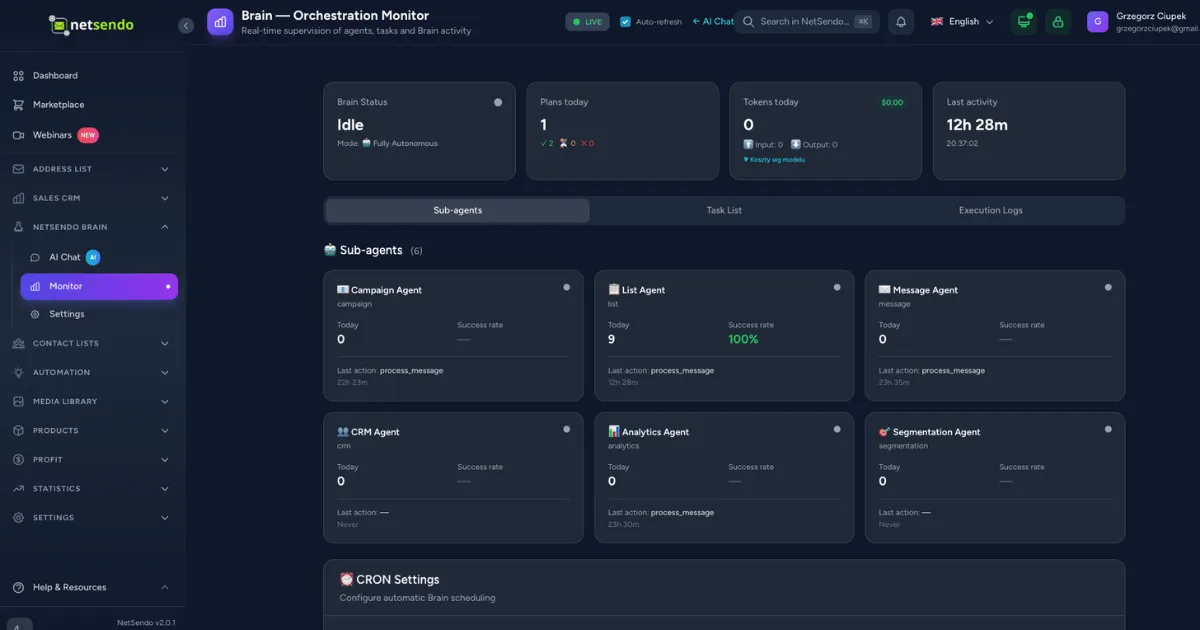
Orchestration Monitor
A new real-time dashboard giving you a transparent, behind-the-scenes look at the AI's decision-making process and task execution.
Live Activity Notifications
Stay informed with a global activity bar and dashboard widget that show what Brain is working on, right as it happens.
Real Token & Cost Tracking
Monitor your exact LLM token usage and estimated costs in real-time, helping you manage your budget with confidence.
Marketing & Sales Skill
A sophisticated new skill that equips the Brain with world-class expertise in email marketing, sales funnels, and CRM optimization.
💡 Benefits & Use Cases: Your AI Co-Pilot in Action
NetSendo Brain isn't just a technical marvel; it's a practical tool designed to solve real-world marketing challenges. Because you host it yourself, you connect your own LLM provider, ensuring you own the entire data pipeline from your subscribers to the AI.
SaaS Onboarding
Problem: "I need to improve new user activation."
Solution: Simply tell Brain: "Create a 5-day email onboarding sequence for new signups to encourage them to use our key features." Brain will write the copy, create the sequence, and activate it.
E-commerce Sales Boost
Problem: "My sales are down and I don't know why."
Solution: Ask Brain: "Analyze my customer data and suggest a campaign to win back dormant customers who haven't purchased in 90 days." Brain will identify the segment, suggest a promotional campaign, and even A/B test subject lines.
Agency Efficiency
Problem: "I need to create monthly reports for five different clients."
Solution: Command Brain: "Generate an analytics report for Client A's campaigns from last month and highlight the top-performing emails." This frees up your team to focus on high-level strategy instead of manual report building.
🛠️ Step-by-Step Guide: Activating NetSendo Brain
Getting started with the AI co-pilot is straightforward. All you need is the latest version of NetSendo and an API key from your preferred LLM provider (like OpenAI, Anthropic, or Google).
-
Update NetSendo
Pull the latest Docker image to update your instance to v2.0.1. This process is seamless and retains all your data.
docker compose pull && docker compose up -d -
Configure Your AI Provider
Navigate to the new Settings → Brain section in your NetSendo dashboard. Enter the API key for your chosen language model.
-
Explore the Orchestration Monitor
Go to the new Brain → Monitor page. Here you'll see the status of all AI agents. Initially, they will be idle.
-
Give Your First Command
Head to the Brain's chat interface and give it a task. Start with something simple like: "Write a welcome email for people who subscribe to my newsletter."
-
Watch it Work
Return to the Monitor. You will see the agents activate, log their execution steps, and show the token usage as they complete your request. The global notification bar will also appear, showing the live progress.
ℹ️ Note: NetSendo Brain orchestrates the tasks, but the AI processing is handled by an external Large Language Model (LLM). You must provide your own API key. This ensures you maintain full control over your data and costs.
🎯 Expert Tips for Using NetSendo Brain
Instead of "create a campaign," try "create a 3-part email campaign for my 'Hot Leads' segment to promote our new feature, focusing on the benefit of time-saving." The more context you provide, the better the result.
Review the execution logs in the Orchestration Monitor to understand how the AI breaks down your requests into smaller tasks. This can help you refine your prompts and learn more about marketing automation strategy.
Treat NetSendo Brain as an incredibly skilled co-pilot, not a replacement for your judgment. Always review the copy, segments, and campaigns it creates before launching them to your audience.
Check the "Task List" tab in the Monitor. Brain proactively analyzes your data and suggests high-impact marketing tasks you can approve with a single click. It's like having a consultant on standby 24/7.
Conclusion: The Future of Self-Hosted Marketing is Intelligent
NetSendo v2.0.1 is more than an update; it's a leap forward in what's possible with a self-hosted marketing platform. By integrating a powerful AI orchestrator, NetSendo Brain empowers you to execute sophisticated marketing strategies with simple, natural language commands. You get the intelligence of a full marketing team with the security and data ownership you expect from NetSendo.
Ready to Automate with AI?
Upgrade to v2.0.1 and unlock the power of NetSendo Brain today.

