

NetSendo v1.6.8: Advanced WYSIWYG Editor Unleashed
Ever felt limited by your email editor? You have a clear vision for a beautiful, engaging campaign, but the tools at hand feel clunky and restrictive. At NetSendo, we believe that as a self-hosted platform, you should have ultimate control not just over your data, but also over your creativity. That's why we're thrilled to announce the release of NetSendo v1.6.8.
This update is all about empowering you with a more intuitive and powerful WYSIWYG editor. We've overhauled link and image handling to give you the flexibility you need to build pixel-perfect emails, all while shipping critical fixes for A/B testing, our WordPress/WooCommerce plugins, and the template builder.
🚀 What's New in v1.6.8
This release focuses on giving you a best-in-class content creation experience. Let's break down the major upgrades.
Direct Image Uploads
No more hosting images externally. Upload, resize, and style images directly within the editor.
Advanced Link Editing
Easily edit link text, URL, title, and target, all from a simple, clickable modal.
Critical Bug Fixes
We've resolved key issues with A/B testing, plugin configurations, and dark mode visibility.
A Richer Link Editing Experience
Links are the lifeblood of any campaign. Previously, editing a link's text after creating it was cumbersome. Now, you can simply click on any link to bring up a comprehensive editing modal. You can now control:
- Link Text: Modify the display text of your link on the fly.
- URL: Update the destination URL without recreating the link.
- Title: Add a tooltip for extra context and improved accessibility.
- Target: Choose whether the link opens in the same or a new window.
ℹ️ Note: Any text you highlight before clicking the link icon will now be automatically pre-filled as the "Link Text" in the modal, saving you time.
Powerful Image Formatting at Your Fingertips
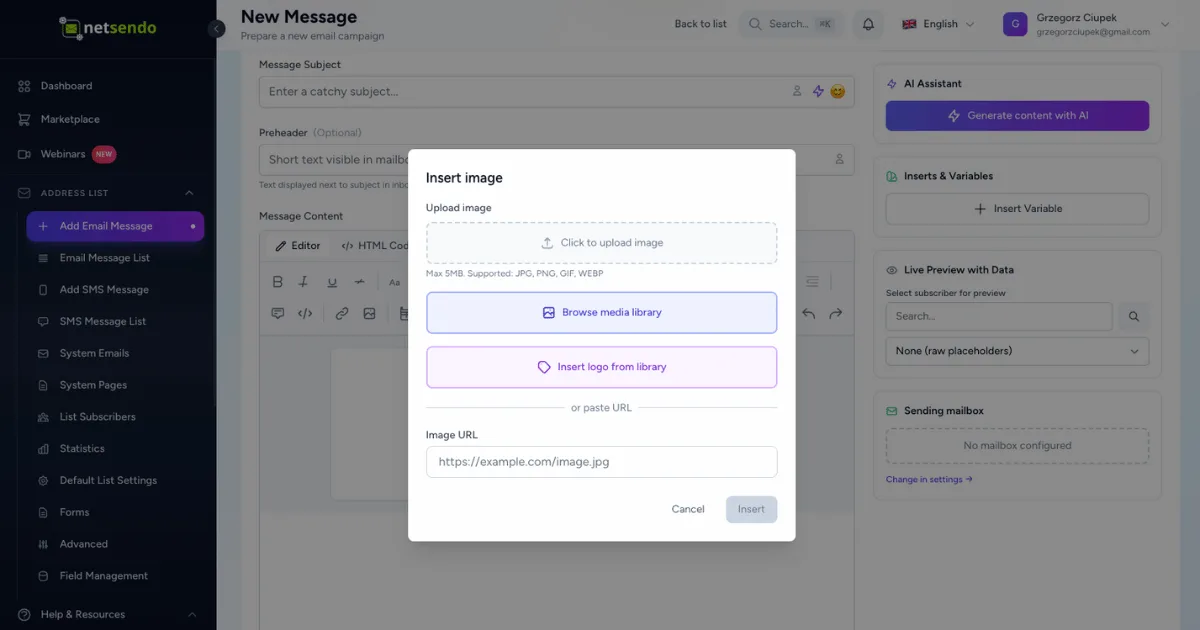
This is a game-changer. We've completely revamped how images are handled in the editor. The biggest update is direct image uploads—simply drag and drop your image or select a file to upload it to your NetSendo storage. No more external URLs needed!
Furthermore, clicking any image now opens an advanced formatting modal where you can:
- Wrap Text: Use the "Float" option to wrap text neatly around your images (left or right).
- Control Margins: Add spacing around your image with a simple slider (0-50px).
- Round Corners: Soften your images with the "Border Radius" slider for a modern look.
Key Fixes and Stability Improvements
A great feature set needs a stable foundation. We've also addressed some critical bugs:
- A/B Testing: Drafts for A/B test campaigns now save all variants correctly.
- WordPress/WooCommerce Plugins: The "User ID not set" warning is fixed, ensuring a smooth pixel setup.
- Template Builder: Links are no longer clickable in edit mode, and dark mode visibility for WooCommerce product blocks is fixed.
💡 Benefits & Real-World Use Cases
E-commerce: Engaging Product Announcements
Use the new image features to create stunning product showcases. Upload a high-quality product photo, set it to float left, and write compelling copy that wraps around it. Add rounded corners to match your brand's modern aesthetic. This creates a professional, catalog-like feel right inside your email.
SaaS: Clearer Onboarding Emails
Improve your user onboarding sequences with clearer calls-to-action. Use the advanced link editing to add a descriptive "Title" to your "Get Started" button link. This adds a helpful tooltip on hover and improves accessibility for users with screen readers, ensuring everyone understands the next step.
Agencies: Faster Campaign Creation
For agencies managing multiple clients, speed is everything. The new click-to-edit functionality for both links and images drastically reduces the time spent making adjustments. Quickly update a client's CTA link or resize a banner image without starting from scratch, allowing you to deliver campaigns faster.
📋 Step-by-Step: Creating a Text-Wrapped Image Layout
Ready to try it out? Here’s how to create a beautiful text-wrapped layout in just a few clicks:
-
Add Your Text
Drag a text block into the canvas and paste or write your content.
-
Insert and Upload Your Image
Place your cursor where you want the image, click the image icon in the toolbar, and drag your image file into the new upload zone.
[Description of a screenshot showing the image upload modal with the drag-and-drop area highlighted.] -
Open the Image Editor
Once uploaded, the image will appear in your text. Simply click on the image to open the advanced formatting modal.
[Description of a screenshot showing the editor with the newly inserted image having a hover outline.] -
Apply Formatting
In the modal, select "Left" or "Right" from the "Float" dropdown. Adjust the "Margin" slider to about 15px to create some breathing room. Click "Save".
[Description of a screenshot of the image formatting modal with Float, Margin, and Border Radius controls.] -
Admire Your Work
Your text will now flow beautifully around the image, creating a professional and dynamic layout.
⚠️ Important: Remember that email client support for advanced styling can vary. Always send a test email to preview your design in different clients like Outlook, Gmail, and Apple Mail.
🎯 Expert Tips for a Better Workflow
While NetSendo allows uploads up to 5MB, it's a web best practice to compress your images first. Use a tool like TinyPNG to reduce file size for faster email load times and a better subscriber experience.
Use the "Title" field on your most important links. It provides context for screen readers, making your emails more accessible to all subscribers. It's a small step that makes a big difference.
Use the new border-radius and margin controls to enforce your brand's style guide. If your website buttons have a 5px border-radius, apply the same to your images for a cohesive look and feel across all your marketing channels.
With the A/B test draft saving bug now fixed, you can confidently set up complex tests, save them, and come back later to finish without fear of losing your work. Experiment freely!
Ready to Elevate Your Email Designs?
NetSendo v1.6.8 is a major step forward in creative control and platform stability. Update your instance today to take advantage of the new WYSIWYG editor and enjoy a smoother, more powerful email marketing experience.
# To update, pull the latest image and restart your containers
docker compose pull
docker compose up -d
