

NetSendo v1.3.1: Your Integrated Webinar Platform
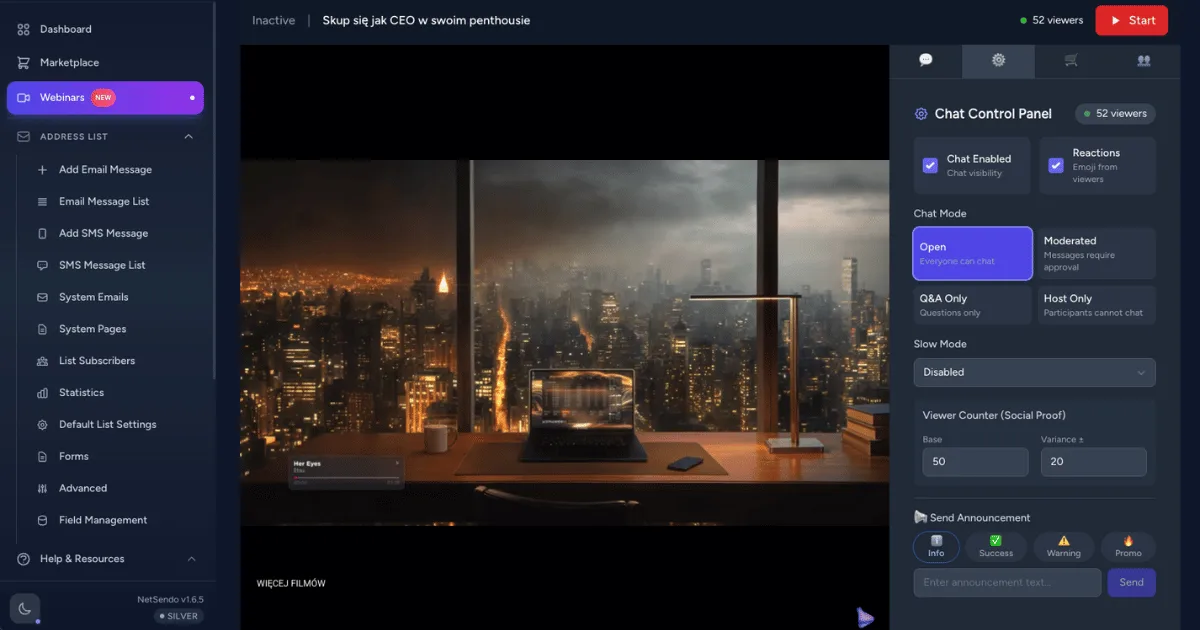
🚀 Turn Your Email List into a Webinar Audience, Instantly
Tired of juggling separate platforms for your email marketing and webinars? The constant data syncing, the clunky user experience, the extra subscription costs—it all creates friction and slows down your growth. What if your webinar platform was built right into your marketing automation tool, giving you full ownership of your data and unlimited potential?
That's exactly what we've built. NetSendo v1.3.1 is a game-changing update that transforms our platform into a powerful, integrated webinar and autowebinar solution. Now you can create, manage, and promote your webinars directly within NetSendo, turning your subscribers into attendees with a single click.
✨ What's New in the Webinar Suite
This release is packed with features designed to give you unparalleled control and automation capabilities for your online events.
Seamless Email & Webinar Integration
This is the star of the show. You can now directly link any webinar to an email campaign. By adding the new [[webinar_register_link]] placeholder to your email, you create a frictionless experience for your subscribers.
When a subscriber clicks the link, they are automatically registered for the webinar and redirected straight to the watch page. No forms, no extra steps. This simple, powerful feature dramatically increases conversion rates from subscriber to attendee.
ℹ️ How it works: We generate a unique, signed URL for each subscriber. This ensures the auto-registration process is secure and correctly attributes the registration to the right contact in your list.
One-Click Registration
Boost attendance by removing registration barriers directly from your emails.
Advanced Scheduling
Set up recurring, fixed-date, or on-demand autowebinars to run on autopilot.
Full Timezone Support
Attendees see event times in their local timezone, reducing confusion and no-shows.
Advanced Autowebinar Scheduling
Move beyond one-off live events. The new "Schedule" UI lets you put your webinars on autopilot, creating evergreen assets that generate leads and nurture customers 24/7. Supported types include:
- Recurring: Run sessions every day at specific times (e.g., daily at 10 AM and 2 PM).
- Fixed Dates: Schedule a series of one-time events for a product launch or special series.
- On-demand: Allow subscribers to watch instantly, whenever they're ready.
- Evergreen: Simulate a live event that's always just about to start.
Total Control Over Your Webinar Lifecycle
We've added a new status dropdown that gives you manual control over your webinar's state. You can now seamlessly transition your event from Draft → Scheduled → Live → Ended → Published. Timestamps like started_at and ended_at are updated automatically, ensuring your event data is always accurate.
🎯 Benefits & Use Cases
An integrated webinar system unlocks powerful new strategies for your business, all from the self-hosted platform you control.
SaaS & Tech Companies
Automate your entire demo and onboarding process. Create a recurring autowebinar that showcases your product's key features. Use the email integration to invite new sign-ups to the next available session, ensuring they get the training they need to become successful customers.
E-commerce Brands
Launch new products with a bang. Host a live Q&A session with your product designers and use the public registration link on social media. After the event, convert it into a "published" on-demand webinar and use it as a valuable piece of content on your product pages.
Marketing Agencies
Offer high-value webinar services to your clients. With NetSendo's multi-tenant capabilities, you can manage webinar funnels for multiple clients from a single installation. Create lead-generating autowebinars that run for clients on autopilot, proving your value month after month.
🛠️ Step-by-Step Guide: Your First Autowebinar Campaign
Ready to launch an automated webinar funnel? Here’s how easy it is with NetSendo v1.3.1.
-
Create Your Webinar
Navigate to "Webinars" and create a new event. Upload your pre-recorded video and fill in the details.
-
Configure the Schedule
In the webinar's "Schedule" tab, select "Recurring" and set it to run every day at 10:00 AM and 3:00 PM.

-
Create an Email Campaign
Go to "Campaigns" and design an email inviting subscribers to your automated training session.
-
Enable Webinar Integration
In the campaign settings, find the new "Webinar Integration" section. Select your webinar from the dropdown and check "Enable auto-registration".

-
Add the Magic Link
In your email editor, add a button or link and set the URL to
[[webinar_register_link]]. NetSendo will automatically replace this with a unique link for each subscriber. -
Launch and Analyze
Send your campaign! Subscribers who click will be instantly registered for the next available session, and you can track attendees right inside NetSendo.
🎯 Expert Tips
Create follow-up email sequences based on webinar attendance. Send a special offer to those who attended the full session and a replay link to those who missed it. Since all data is in NetSendo, this is easy to automate.
Don't forget about the public registration link! Copy it from the webinar edit page and share it on your social media channels or in your website's header to capture leads from outside your existing email list.
After a live event ends, change its status to "Published". This makes it available as an on-demand replay. You can use this as a permanent lead magnet in your evergreen funnels.
⚠️ Important: The new Webinar Email Integration requires NetSendo v1.3.1 or later. Please ensure your instance is up to date to access these features.
Ready to Become a Webinar Powerhouse?
Stop paying for expensive, disconnected webinar tools. Take control of your marketing stack with NetSendo's fully integrated, self-hosted solution.

