

NetSendo v1.6.4: Auto Gender Matching & Fixes
🚀 Introduction: Beyond First-Name Personalization
In modern marketing, personalization is king. We've all moved past the simple “Hi [[first_name]]” to create more engaging experiences. But what if you could take that a step further? What if you could tailor your messaging, offers, and even imagery based on gender, without manually segmenting your audience?
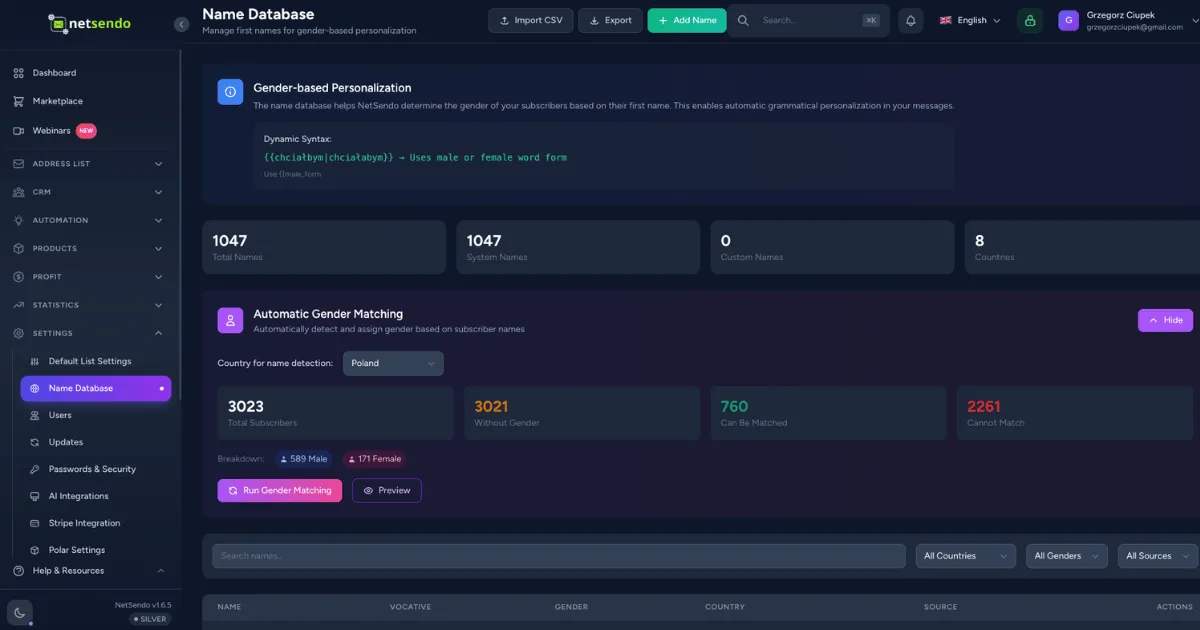
With NetSendo v1.6.4, this is now a reality. We're thrilled to introduce Automatic Gender Matching, a powerful new feature that intelligently assigns gender to your subscribers based on their first name. This update is all about helping you create deeper, more relevant connections with your audience, effortlessly.
✨ What's New in v1.6.4
This release focuses on making your personalization smarter and your workflow smoother. Let's dive into the details.
🤖 Automatic Gender Matching
Think of this feature as a smart assistant for your contact lists. NetSendo now includes a built-in, privacy-friendly database of common first names from around the world. The new system can scan your subscriber lists and automatically assign a 'male' or 'female' gender tag, enabling a new level of segmentation.
International Support
Our name database includes thousands of common names from 8 countries (DE, CZ, SK, FR, IT, ES, UK, US) and is continuously growing.
Background Processing
The matching process runs as a background job, meaning you can kick it off and continue working without performance hits, even on massive lists.
Clear & Simple UI
A new settings panel allows you to preview matches, run the job, and see detailed results, all with a few clicks.
🔧 Important Fixes and Enhancements
We've also been busy squashing bugs and improving consistency:
- New Placeholders: You can now use
[[fname]]and[[lname]]as convenient aliases for[[first_name]]and[[last_name]]. - Preheader Placeholders Fixed: All placeholders, including the powerful vocative case (e.g.,
[[!fname]]), now work correctly in the email Preheader field. - Preview & Template Fixes: We've resolved errors that occurred when previewing messages with empty subjects and when refreshing product data in the Template Builder.
💼 Benefits & Use Cases
Automatic Gender Matching isn't just a technical feature; it's a tool to unlock powerful marketing strategies.
E-commerce Hyper-Personalization
Stop sending generic promotions. Now you can easily create segments for "men" or "women" and:
- Showcase gender-specific product collections (e.g., "New Arrivals for Men").
- Use lifestyle imagery in your emails that resonates better with the target gender.
- Craft copy that speaks their language, leading to higher engagement and conversions.
SaaS & B2B Onboarding
Make a great first impression. Use gender data to slightly tweak your onboarding emails:
- Address users more formally or informally where culturally appropriate (e.g., "Welcome, Mr. Smith" vs "Welcome, Ms. Doe").
- Personalize case studies or examples to be more relatable to the user.
🛠️ Step-by-Step Guide: Getting Started
Ready to put this feature to work? It only takes a few minutes to get started.
-
Update NetSendo
Ensure you are running version 1.6.4 or newer. Pull the latest Docker image and restart your instance.
docker compose pull && docker compose up -d -
Navigate to Name Database
In your NetSendo dashboard, go to
Settings → Name Database. You'll find the new "Automatic Gender Matching" section here. -
Preview Your Matches
Click the "Preview Matches" button. A modal will appear showing you how many subscribers can potentially be matched, giving you a clear idea of the impact.
ℹ️ Note: The preview shows subscribers who have a first name and do not already have a gender assigned.
-
Run the Matching Job
Happy with the preview? Click "Start Matching" to begin the process. The job will run in the background. You can safely navigate away from the page.
-
Review the Results
Once complete, you'll receive a notification. Return to the settings page to see a summary of how many subscribers were successfully matched, which were unmatched, and if any errors occurred.
-
Create Your Segments
Now the fun part! Go to the Subscribers tab and create a new segment. Use the "Gender" attribute to filter your audience and start building hyper-targeted campaigns.
🎯 Expert Tips
If the automatic process misses some names, especially unique or regional ones, you can manually add them in the Name Database tab. This improves accuracy over time.
The real power comes from combining segments. Create dynamic lists like "women who have not purchased in 60 days" or "men who clicked on a specific product category."
For languages with grammatical gender (like Polish or French), you can now create much more natural-sounding copy. Combine a gender segment with language-specific text for maximum impact.
As a self-hosted platform, all this data stays on your server, under your control. Remember to use this data responsibly to enhance the user experience, not to be intrusive.
Ready for Smarter Personalization?
NetSendo v1.6.4 is available now. Update your instance to unlock automatic gender matching and benefit from a more robust and consistent platform.

