

NetSendo v1.6.6: Advanced A/B Testing & Visual Editor
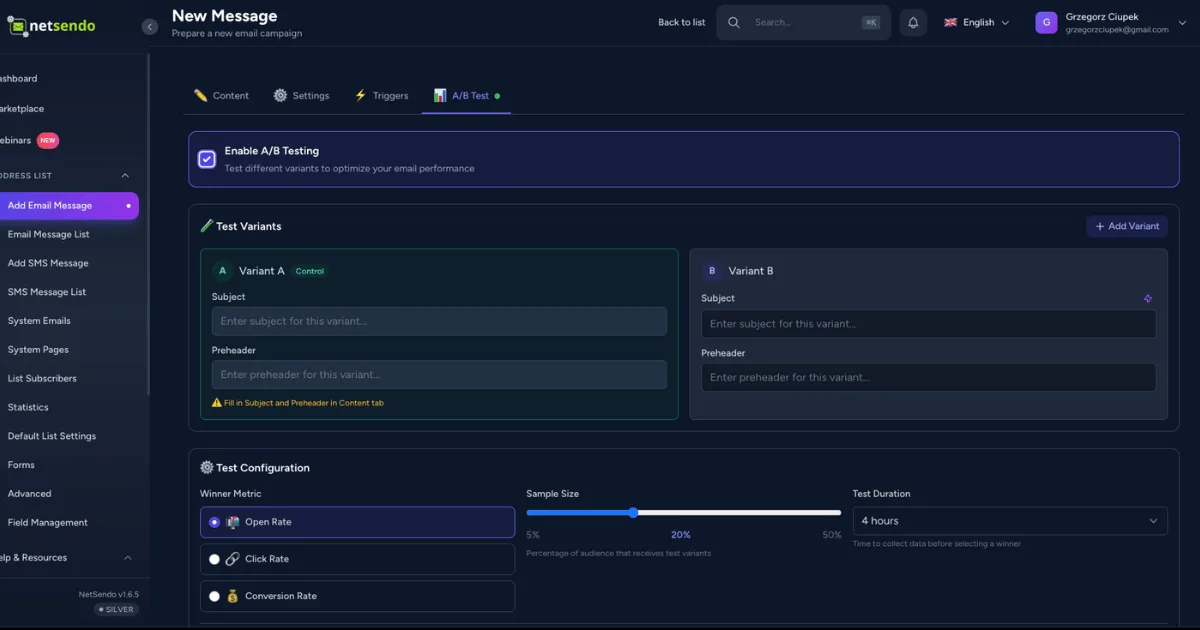
In digital marketing, assumptions are expensive. Guessing which subject line will perform best or which call-to-action will drive more clicks can lead to missed opportunities and wasted resources. The only way to truly know what works is to test. That's why we're thrilled to announce the release of NetSendo v1.6.6, a game-changing update focused on data-driven optimization.
This release introduces an enterprise-grade A/B Testing system directly into the platform, giving you complete control over your campaign optimization. We've also added a full visual editor for HTML templates, making customization easier than ever. Take control of your marketing stack and start making decisions based on data, not guesswork.
🚀 What's New in v1.6.6
This update is packed with features designed to enhance your workflow and boost your campaign performance. Let's dive into the details.
Enterprise-Grade A/B Testing
Move beyond simple subject line tests. Our new A/B testing suite is built for professional marketers who demand robust features and statistical accuracy. It’s an integrated solution that gives you the power to test nearly every aspect of your email messages.
Multi-Variant Testing
Test up to 5 variants (A-E) simultaneously to gather insights faster than a standard A/B split.
Flexible Test Types
Test Subject lines, Preheaders, Email Content, Sender Names, and even Send Times to find the perfect combination.
Automatic Winner Selection
NetSendo automatically sends the winning variant to the rest of your list based on Open Rate, Click Rate, or Conversion Rate.
Statistical Confidence
Our backend uses both Bayesian and Frequentist methods to ensure your test results are statistically significant.
ℹ️ Note: The Control Variant (A) is locked to your main message content to ensure a consistent baseline for all your tests. Use our new AI Assistant to generate creative ideas for your other variants!
Full HTML Visual Editing
Tired of switching between your code editor and NetSendo to tweak your HTML templates? Now, you can edit your full HTML templates directly in our visual editor. Just click on any text element to edit it in a simple modal, complete with variable insertion and live previews.
This new functionality streamlines the template editing process, saving you time and reducing the friction between design and implementation. Hover highlights guide you to editable elements, making the experience intuitive and fast.
UI Enhancements & Key Fixes
We've added a new A/B test indicator (🧪) to the Messages list, giving you an at-a-glance view of a campaign's test status—from draft to completion. We also fixed a crucial API endpoint, resolving a 404 Not Found error for our WordPress and WooCommerce plugin users and ensuring smooth pixel tracking.
🎯 Benefits & Use Cases
Here’s how you can leverage these new features in real-world scenarios:
E-commerce: Optimize Your Promotions
An online store wants to maximize revenue from a flash sale. With NetSendo v1.6.6, they can A/B test:
- Subject Line A: "Flash Sale! 25% Off Everything"
- Subject Line B: "⚡ Don't Miss Out on 25% Off!"
- Subject Line C: "Your Next Favorite [Product] is 25% Off"
NetSendo will send these variants to a small sample of the audience, identify the one with the highest click rate, and automatically send it to the remaining customers.
SaaS: Improve User Onboarding
A SaaS company wants to increase the activation rate for new users. They can test the content of their first onboarding email:
- Variant A (Control): A text-heavy email explaining three key features.
- Variant B (Content Test): An email with GIFs demonstrating just one key feature.
By setting the winner criteria to "Conversion Rate" (tracked via a goal pixel), they can definitively find out which email content drives more users to activate.
🛠️ Step-by-Step Guide: How to Set Up Your First A/B Test
Ready to get started? Launching an A/B test in NetSendo is straightforward. Follow these steps:
-
Create Your Message
Start by creating your email message as you normally would. This will serve as your "Control" or Variant A. Fill out the subject, preheader, and content.
-
Enable A/B Testing
In the Message Creator, find the A/B Testing Panel and toggle it on. The panel will appear, allowing you to configure your test.
-
Add and Configure Variants
Click "Add Variant" to create Variant B. Choose what you want to test (e.g., "Subject"). Enter your alternative subject line. You can add up to 4 additional variants (for a total of 5).
[Description of a screenshot showing the A/B Testing Panel in the NetSendo UI, with fields for test type, sample size, and variant configuration.] -
Set Test Parameters
Define your test settings. Choose the sample size (e.g., 20%), the test duration (e.g., 4 hours), and the metric for selecting a winner (e.g., Open Rate).
-
Launch Your Campaign
That's it! Schedule or send your message. NetSendo will handle the rest: sending the variants to the sample audience, monitoring the results, and sending the winning version to the remaining subscribers automatically.
💡 Expert Tips
If you test a new subject line and new content in the same variant, you won't know which change caused the performance shift. For the clearest results, isolate one variable per test (e.g., test only subject lines or only sender names).
Don't end a test prematurely just because one variant takes an early lead. Let the test run for the configured duration to reach statistical significance. This ensures your results are reliable and not just due to random chance.
Stuck for ideas? Use the integrated AI Assistant to generate compelling alternative subject lines or content for your variants. Provide it with the control version's content for context-aware suggestions.
⚠️ Important: A/B testing is most effective with larger list sizes. If your list is small, consider using a larger sample size percentage to gather enough data for a meaningful result.
Conclusion: Optimize, Don't Guess
NetSendo v1.6.6 puts powerful, data-driven optimization tools directly in your hands. With enterprise-grade A/B testing and a streamlined visual editor, you have everything you need to refine your strategy, boost engagement, and maximize your ROI—all from your self-hosted platform.
Owning your marketing stack means owning your data and your tools. Now, you can leverage them to achieve results that rival any enterprise SaaS solution.
Ready to Boost Your Performance?
Dive into the new features and start making data-driven decisions today.

