

NetSendo v1.7.0: A Full Sales CRM is Here
Stop Juggling Tools. Start Closing Deals.
How many tabs do you have open right now? One for your email marketing, one for your CRM, maybe a spreadsheet for tracking leads? The separation between marketing and sales tools creates friction, data silos, and missed opportunities. You spend more time syncing data than actually engaging with your customers.
What if your sales pipeline lived right alongside your email campaigns? What if a new subscriber could instantly become a lead in your Kanban board? With NetSendo v1.7.0, this is now your reality. We're thrilled to introduce a complete, self-hosted **Sales CRM** built directly into the platform you already trust for your marketing automation.
🚀 What's New in NetSendo v1.7.0
This is one of our biggest releases ever, focused on unifying your entire customer lifecycle—from first contact to closed deal—all under one self-hosted roof.
Introducing the NetSendo Sales CRM: Your Unified Command Center
The star of this release is a full-featured Sales CRM. Think of it as the central nervous system for your sales operations, deeply integrated with your marketing engine. No more Zapier bills just to connect your lead forms to your sales team.
Unified Profiles
Contacts and Companies have detailed profiles, linking directly to subscriber data, activity timelines, notes, and tasks.
Interactive Pipelines
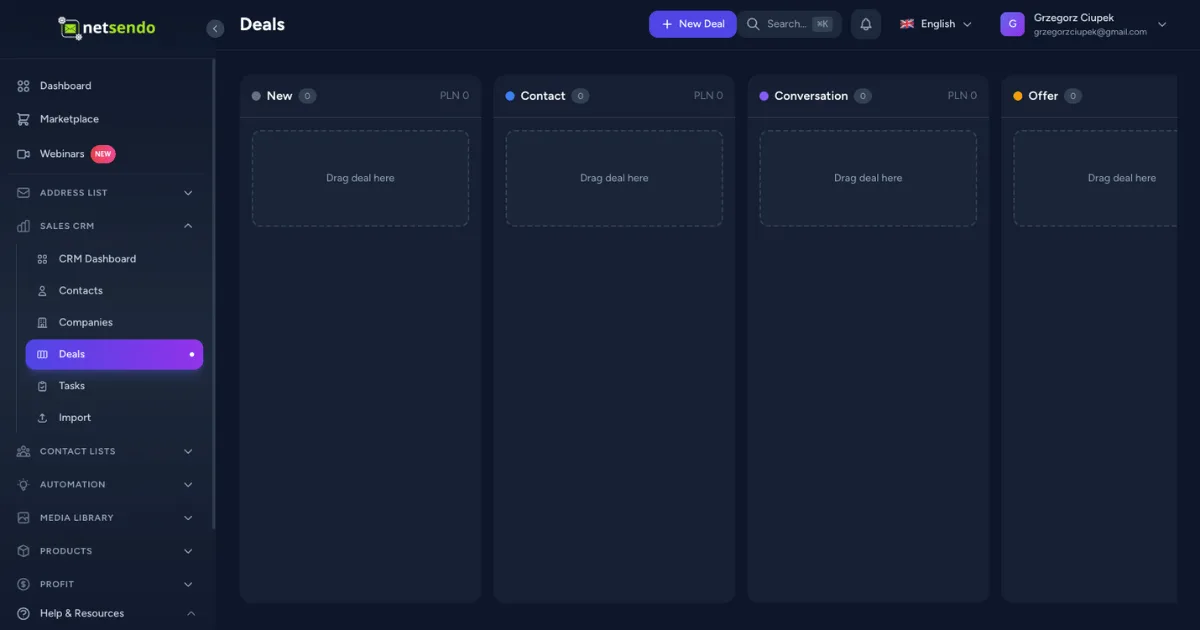
Visualize your sales process with a drag-and-drop Kanban board. Create custom stages and move deals forward with ease.
Task Management
Assign and track tasks linked to deals, companies, or contacts. Never miss a follow-up again with dedicated views for overdue, today, and upcoming tasks.
CRM Automation
New event triggers like CrmDealStageChanged let you build powerful automations, like starting an onboarding sequence the moment a deal is marked 'Won'.
A Creative Revolution: The WYSIWYG Editor Reimagined
We've given our email editor a major overhaul, giving you more creative control and a smoother editing experience.
- Drag-to-Resize Images: Simply click an image and drag the handles to resize it proportionally.
- Text Case Formatting: Instantly change text to UPPERCASE, lowercase, or Capitalized Case with a new toolbar dropdown.
- Improved Font Size Picker: The toolbar now shows the currently selected font size, and a 'Default' option makes resetting styles a breeze.
Enhanced SMS & List Management Tools
Based on your feedback, we've added critical features for our SMS and high-volume users.
ℹ️ New Feature: You can now send a test SMS to any number before launching your campaign, just like with emails! The modal even lets you preview content with sample placeholder data.
Additionally, we've replaced the static list filter on the messages pages with a **searchable list picker**. Finding the right list among hundreds is now as simple as typing its name or ID.
📈 From Marketing to Sales: Practical Use Cases
Here’s how you can leverage the new CRM to break down silos and grow your business.
SaaS Onboarding & Conversion
A user signs up for a trial. NetSendo automation instantly:
- Creates a Contact in the CRM.
- Creates a new Deal in the 'Trial Started' stage of your pipeline.
- Assigns a task to a sales rep to check in after 3 days.
- When the deal is dragged to 'Converted', another automation moves them to the 'Customers' list and triggers a welcome sequence.
Agency Client Acquisition
Manage your agency's new business pipeline directly within NetSendo:
- Use a NetSendo form on your site for 'Get a Quote' requests.
- Submissions automatically create a Deal in your 'New Leads' pipeline stage.
- Use tasks to schedule discovery calls and proposal deadlines.
- Keep all communication notes and client details attached to the Contact, giving your team full context.
🛠️ Your First 15 Minutes with the Sales CRM
Ready to get started? Upgrading and setting up your new CRM is fast and simple. As always, remember to back up your data before any major update.
-
Update Your Instance
Pull the latest Docker image to get v1.7.0. It's a single command:
docker compose pull && docker compose up -d -
Explore the New CRM Section
After updating, you'll see a new "CRM Sales" icon in the main navigation sidebar. Click it to enter your new command center.
-
Customize Your First Pipeline
Navigate to Deals and find the pipeline settings. Customize the default stages to match your sales process (e.g., Lead In → Contact Made → Demo Scheduled → Won/Lost).
-
Create Your First Deal
Go to the main Deals Kanban board, click 'Add Deal', link it to a test contact, and give it a value. Now, drag and drop it between stages to see it in action!
⚠️ Important: The new CRM module includes database migrations. Please ensure you have a working backup before running the update command.
🎯 Expert Tips for CRM & Automation Mastery
Use NetSendo's native automation builder. Set a trigger (e.g., 'Form Submitted' for a demo request form) with an action to 'Create a CRM Deal'. This completely automates your lead capture process.
Email sequences are great, but a personal call closes deals. When a deal reaches a critical stage like 'Proposal Sent', create an automation that assigns a task to the deal owner to call the contact in 2 days.
When using the CSV importer for Contacts or Companies, use the deduplication logic to prevent creating duplicates for existing subscribers. A clean CRM is an effective CRM.
🔗 Unify Your Growth Engine Today
NetSendo v1.7.0 represents our commitment to providing a comprehensive, self-hosted platform for your entire growth strategy. By integrating sales and marketing, you gain unparalleled control over your data, reduce tool complexity, and empower your team to build better customer relationships.
Stop paying for separate tools that don't talk to each other. With NetSendo, you own the platform, you own the data, and now, you own the entire funnel.
Ready to Upgrade?
Get the power of a Sales CRM inside your marketing automation platform.

