

NetSendo v1.6.7: Boost Sales with WooCommerce Variants
Introduction
As an e-commerce business, personalization is not just a buzzword—it's your key to higher conversions. Customers expect to see content that's relevant to their specific interests. But how do you translate that to your email campaigns when your products have multiple sizes, colors, or styles? Sending a generic product link is a missed opportunity.
We're thrilled to announce the release of NetSendo v1.6.7, a game-changing update designed to bridge the gap between your WooCommerce store and your email marketing. Now, you can feature specific product variants directly in your emails, creating a hyper-personalized shopping experience for your subscribers.
🚀 What's New in v1.6.7
This release focuses on two major areas: giving you more powerful e-commerce tools and making your data easier to analyze.
Deeper WooCommerce Integration: Product Variants
Previously, you could add WooCommerce products to your emails, but you were limited to the parent product. Now, we've unlocked a new level of detail. Think of it as going from a generic catalog to a specific, detailed product page—right inside your email.
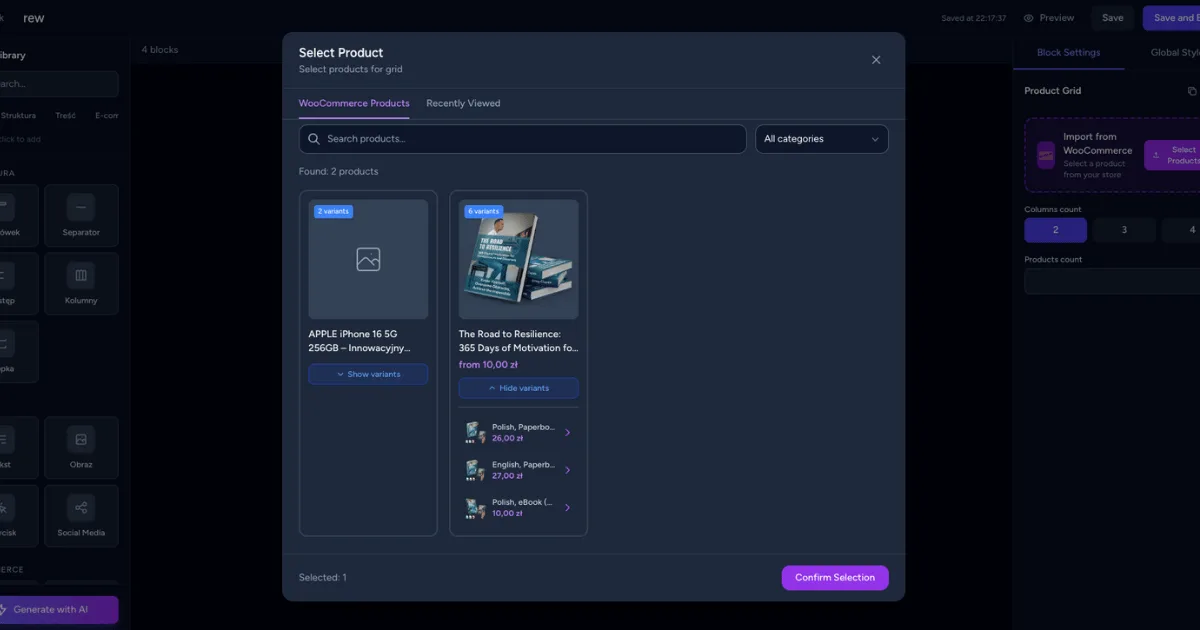
Variant-Aware Product Picker
Variable products are now clearly marked with a badge and variant count, so you can see them at a glance.
Variant Selection UI
Simply expand a variable product to see all its variations. Select the exact size, color, or style you want to feature.
Automatic Attribute Display
The email block automatically displays the selected variant's attributes (e.g., "Size: M, Color: Blue") for ultimate clarity.
ℹ️ Note: This feature requires an active connection to your WooCommerce store via our integration. You can set this up in Settings → Integrations.
A Revamped Statistics Dashboard
Data is only useful if you can access and understand it. For users with large subscriber lists, digging through activity logs was becoming a chore. We've rebuilt the statistics backend to be faster, more powerful, and more intuitive.
- Server-Side Pagination: No more 20-item limits! Effortlessly browse through all your recent open and click events, no matter how large your list is.
- Column Sorting: Instantly sort activity by email, time, or URL to find the information you need, fast.
- Clickable URLs: URLs in the "Recent Clicks" list are now clickable, making it easy to verify links.
- Enhanced Charts: Key metrics are now displayed directly on chart segments, giving you a clear performance overview without needing to hover.
💡 Benefits & Real-World Use Cases
Here’s how you can turn these new features into tangible results.
E-commerce: Hyper-Targeted Abandoned Carts
A customer adds a "Large, Forest Green" hoodie to their cart but doesn't check out. With v1.6.7, your automated abandoned cart email can now show them an image of that exact hoodie, complete with the selected attributes. This level of personalization is far more effective than a generic reminder.
SaaS: Feature Announcement with a Twist
Imagine you're launching a new "Pro" plan with different tiers (e.g., "Pro Starter," "Pro Business"). You can use product variants to showcase each specific tier in your announcement email, linking each one directly to its unique checkout page. This reduces friction and clarifies your new offering.
Agencies: Data-Driven Client Reporting
Quickly deliver precise insights to your clients. With the new sorting and pagination in the stats dashboard, you can easily identify the most-clicked links in a campaign or find a specific subscriber's activity. This makes building comprehensive and accurate reports faster than ever.
⚙️ How to Use WooCommerce Product Variants
Ready to get started? It only takes a few clicks. Here's a quick walkthrough:
-
Ensure WooCommerce is Connected
Navigate to
[Image: Screenshot of the WooCommerce integration settings page with a connected status.]Settings → Integrationsin your NetSendo dashboard and make sure your store is successfully synced. -
Add a Product Block
In the email template builder, drag and drop a "Product" block into your layout.
[Image: GIF showing a product block being dragged into the email canvas.] -
Open the Product Picker
Click the block to open the product selection modal. You'll now see a new badge like "5 Variants" on your variable products.
[Image: Screenshot of the Product Picker, highlighting a product with the "Variants" badge.] -
Select Your Variant
Click the variable product to expand its list of variations. Choose the specific variant you want to feature in your email.
[Image: Screenshot showing the expanded list of variants (e.g., Red-S, Red-M, Blue-S) for a single product.] -
Preview Your Email
The product block will automatically populate with the variant's image, price, and attributes (e.g., "Color: Forest Green"). You're all set!
[Image: Screenshot of the final email block showing the product variant image and its attributes displayed as tags.]
⚠️ Important: The initial sync after updating may take a few moments as NetSendo fetches all your product variant data. Performance will be fast and cached for subsequent use.
🎯 Expert Tips
Create segments based on past purchases. Send a promotional email featuring new color variants of a t-shirt only to customers who have previously bought that same t-shirt.
Use the newly sortable "Recent Clicks" list to see which specific variants are driving the most traffic from your campaigns. This can provide valuable insights into what your audience wants.
Set up an automation that triggers an email when a specific, highly-requested variant (e.g., "Size 10, Midnight Black") is back in stock. This is a powerful way to recover lost sales.
Upgrade Your E-commerce Game Today
NetSendo v1.6.7 gives you the tools to create more relevant, personal, and effective e-commerce campaigns. Stop sending generic product emails and start showcasing the exact variations your customers love.
As always, NetSendo is self-hosted, giving you full control over your data and unlimited sending capabilities. Update your instance to get started!

