

NetSendo v1.7.2: Advanced Email Funnels & A/B Testing
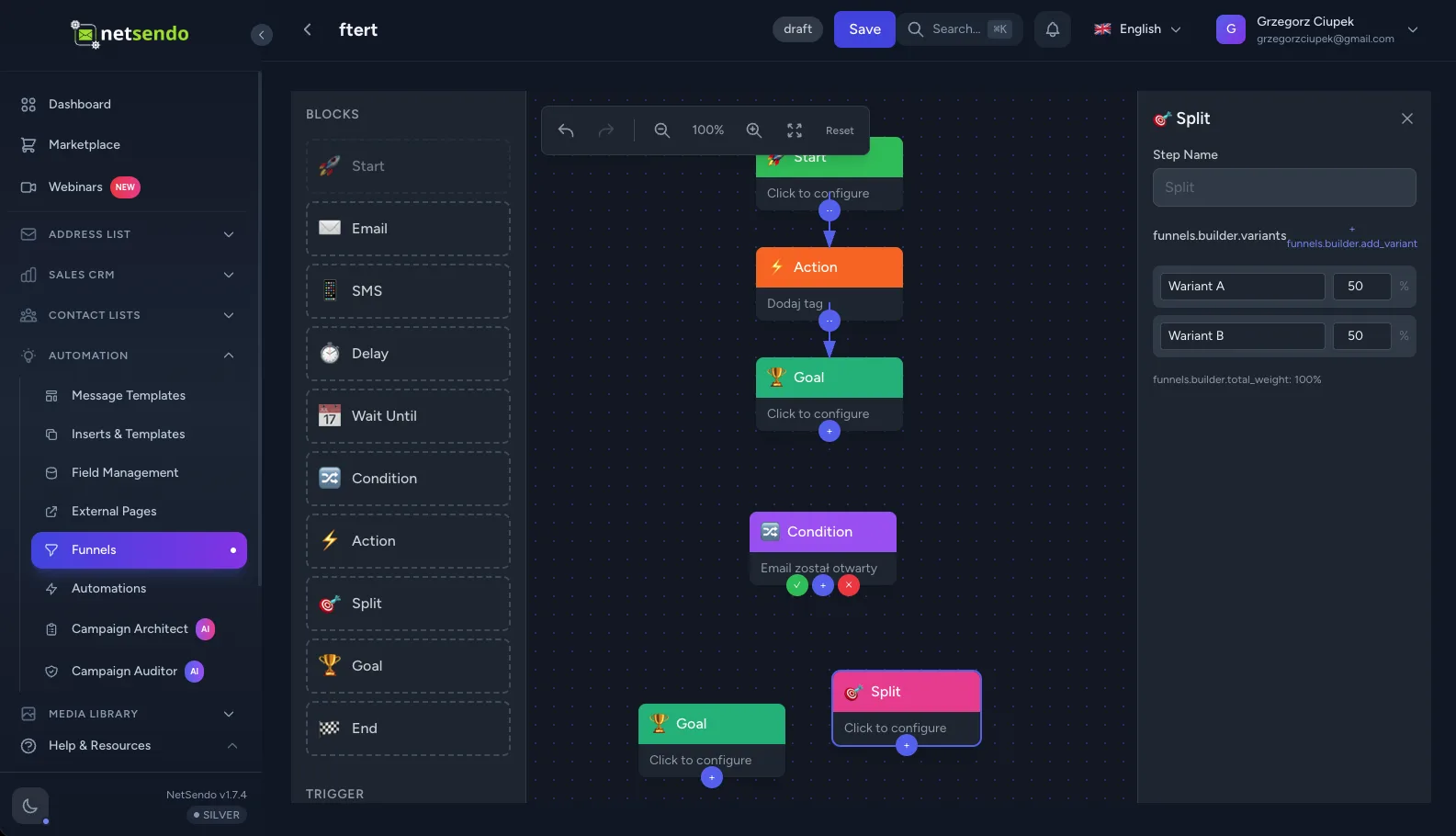
🚀 What's New: The All-New Email Funnels Engine
Version 1.7.2 isn't just an update; it's a quantum leap for your marketing automation. We've rebuilt our automation engine from the ground up to introduce Email Funnels—a powerful, visual canvas for crafting sophisticated customer journeys. Go beyond simple autoresponders and start building intelligent, responsive, and high-converting campaigns.
The Visual Funnel Builder: Your Marketing Canvas
Say goodbye to clunky, linear sequence builders. Our new drag-and-drop visual editor lets you map out every step of your customer's journey. We've added four powerful new step types to give you ultimate control:
SMS Step
Engage subscribers directly on their phones. Perfect for time-sensitive alerts or multi-channel campaigns.
Wait Until
Pause a funnel until a specific date and time. Ideal for product launches, webinar reminders, or holiday promotions.
Goal Step
Track key conversions, like a purchase or a signup. When a subscriber reaches a goal, you can end the funnel or trigger other actions.
Split Step
Create A/B tests to experiment with different subject lines, content, or entire email paths to see what performs best.
The builder is packed with productivity features like Undo/Redo, zoom controls, and keyboard shortcuts, making funnel creation faster than ever.
Data-Driven Decisions with A/B Testing
Stop guessing what works. The new Split Step allows you to route subscribers down different paths to test your hypotheses. Our system handles the rest:
- Weighted Distribution: Send traffic to different variants in any proportion you choose (e.g., 50/50, 80/20).
- Auto-Winner Detection: Let NetSendo automatically monitor performance and declare a winner based on your goal conversions, saving you time.
- In-Depth Analytics: Compare variant performance side-by-side on the A/B test dashboard.
Track What Matters: Revenue Goals & Advanced Analytics
A funnel is only as good as its results. Our new Goal Tracking and analytics dashboard give you the insights you need to measure ROI accurately.
- Revenue Tracking: Assign a monetary value to your goals to see exactly how much revenue each funnel generates.
- External Conversion API: Use our new webhook endpoint
/api/funnel/goal/convertto trigger goal conversions from external platforms like Stripe or WooCommerce. - Step-by-Step Analysis: Pinpoint where subscribers are dropping off with detailed conversion rates for every step in your funnel.
ℹ️ Jumpstart Your Campaigns: We've included three pre-built funnel templates (Welcome, Re-engagement, Product Launch) to get you started immediately. You can also save your own funnels as templates to reuse across projects!
✨ Quality-of-Life Improvements in v1.7.2
This release also includes several other powerful features designed to save you time and improve your deliverability.
Automatic Image Compression
Slow uploads are a thing of the past. NetSendo now automatically compresses and resizes images over 1MB right in your browser before they are uploaded. This means faster media library performance, less server storage used, and a smoother experience for you.
Smarter Bounce Management
Gain granular control over your deliverability. You can now set a soft bounce threshold and decide whether a bounce status applies to a single list or globally to the subscriber. This helps protect your sender reputation while giving you the flexibility to manage different types of lists.
💡 How to Build Your First A/B Tested Funnel
Ready to see the new builder in action? Let's create a simple welcome sequence that A/B tests two different subject lines.
-
Choose a Template or Start Fresh
Navigate to Funnels in your NetSendo dashboard and click "Create Funnel". For this guide, select the "Welcome Sequence" template.
-
Add a Split Step
After the "Trigger" step, click the "+" icon and select the "Split" step. This will create two paths: Variant A and Variant B.
-
Configure Your Variants
Add an "Email" step to each path. In Variant A, use the subject line "Welcome to the Club! Here's your gift." In Variant B, try "Your gift is inside! Thanks for joining."
-
Set a Goal
After the paths merge, add a "Goal" step. Configure it to track "Clicked a Link" and select the link to your special offer from the welcome emails. This will be our success metric.
-
Activate and Analyze
Set the funnel to "Active". NetSendo will now automatically split new subscribers between the two variants. Check the "A/B Tests" tab in your funnel's analytics to see which subject line drives more clicks!
🎯 Expert Tips for Power Users
Connect your payment processor (e.g., Stripe) to the /api/funnel/goal/convert endpoint. When a purchase is made, send the subscriber's email and the sale amount to accurately track the ROI of your sales funnels.
Launching a Black Friday sale? Use the "Wait Until" step to hold subscribers in a funnel until midnight on the day of the sale, ensuring everyone gets the message at the exact right moment.
Need to troubleshoot? Head to the "Subscriber Management" tab in your funnel stats. You can pause, resume, or even move a specific subscriber to a different step, giving you full control.
⚠️ Important: The new Email Funnels engine is a major upgrade. While existing automations will continue to function, we recommend rebuilding them using the new visual builder to take advantage of these powerful features.
Ready to Build Smarter Automations?
The power of visual funnels, A/B testing, and revenue tracking is now at your fingertips. As a self-hosted platform, you get all this with no limits on subscribers or sends.

