

Email deliverability for self-hosted senders (2026 guide)
Updated: · 12 min read · NetSendo Team
What do Gmail, Yahoo and Outlook require from bulk senders in 2026?
All three big consumer mailbox providers now require authenticated mail from high-volume senders. You need SPF and DKIM, plus a DMARC record of at least p=none that passes through a domain aligned with your visible From address. Gmail and Yahoo also require one-click unsubscribe and a spam complaint rate below 0.3%. Outlook.com rejects non-compliant mail outright.
| Requirement | Gmail (personal accounts) | Yahoo | Outlook.com (outlook.com, hotmail.com, live.com) |
|---|---|---|---|
| Who it applies to | Senders of close to 5,000+ messages/day to personal Gmail accounts. Once you cross it, you count as a bulk sender permanently | "Bulk senders" (no number given on the page) | Domains sending more than 5,000 emails/day |
| SPF | Required (SPF and DKIM) | Required (SPF and DKIM) | Must pass |
| DKIM | Required. Key of 1024 bits or longer | Required | Must pass |
| DMARC | Required. "Your DMARC enforcement policy can be set to none" | "Valid DMARC policy with at least p=none", and DMARC must pass | "At least p=none" |
| Alignment | From domain aligned with the SPF or DKIM domain | From domain aligned with the SPF or DKIM domain | Align with SPF or DKIM, "preferably both" |
| One-click unsubscribe | Required for marketing and subscribed mail (RFC 8058, one HTTPS URL) | Required. RFC 8058 POST "highly recommended", mailto accepted | "Functional unsubscribe links" recommended |
| Honour unsubscribes | Within 48 hours | Within 2 days | Not specified |
| Spam rate | Below 0.30% in Postmaster Tools. Aim for under 0.10% | Below 0.3% | No number given |
| Reverse DNS (PTR) | Valid forward and reverse DNS | Valid forward and reverse DNS, "meaningful, non-generic" | Not listed |
| TLS | Required | Not listed | Not listed |
| Feedback / data | Postmaster Tools | Complaint Feedback Loop, "needed for all DKIM domains" | SNDS and JMRP |
| Enforcement | Rules since 1 Feb 2024. Stricter enforcement from Nov 2025, including temporary and permanent rejections | In force (no date on the page) | Since 5 May 2025: 550; 5.7.515 Access denied… |
As of 2026-10-17. Sources: Google sender guidelines, Google FAQ, Yahoo best practices, Microsoft announcement.
Two details catch self-hosters out:
- Gmail's spam rate is measured, not estimated. It is the rate shown in Postmaster Tools. Google tells senders never to reach 0.30% and to keep it under 0.10%.
- Microsoft changed course. The April 2025 post first said non-compliant mail would go to Junk. The 29 April update replaced that with outright rejection from 5 May 2025, using the 5.7.515 error.
If you send fewer than 5,000 a day, Google still requires SPF or DKIM, valid PTR records, TLS, RFC 5322-formatted messages and a spam rate below 0.3% from all senders. Set everything up anyway. Volume grows, and the bulk-sender label never goes away.
Why is deliverability harder when you self-host?
Self-hosting doesn't change the rules. It changes who's responsible. On a SaaS platform the vendor runs the sending infrastructure and polices other customers on shared IPs. When you run your own platform, you own every link in the chain:
- DNS: SPF, DKIM, DMARC and, for your own IPs, PTR.
- The sending path: an SMTP relay or API (Amazon SES, Mailgun, SendGrid, Gmail API) or your own MTA.
- IP reputation: shared or dedicated, and warm-up if it's new.
- List quality: consent, bounces, suppression, inactive contacts.
- Monitoring: Postmaster Tools, SNDS, DMARC reports, blacklists.
The upside is control. No vendor suspends you for another customer's spam, and you can keep costs flat as the list grows. The downside is that nobody else will fix it.
How do SPF, DKIM and DMARC fit together?
SPF authorises the servers that may send for the envelope (bounce) domain. DKIM signs the message with a key published in your DNS. DMARC checks that at least one of them passes for a domain aligned with the From address people see, and tells receivers what to do when neither does.
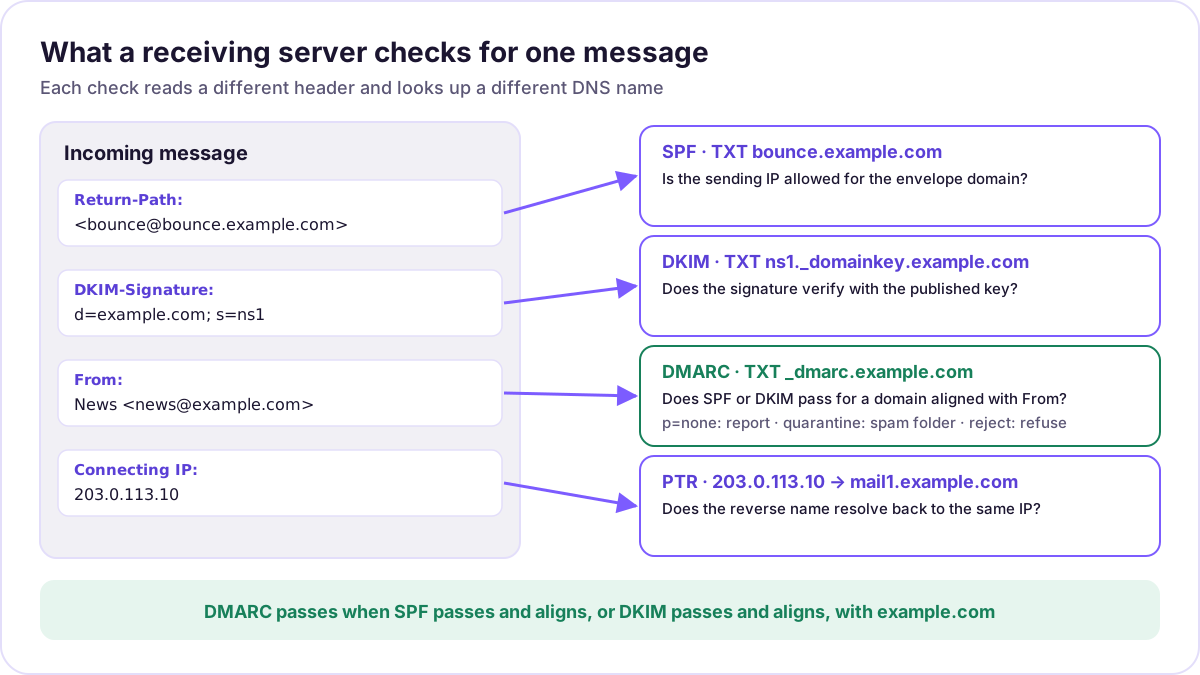 The four DNS lookups a receiver makes for one incoming message, and which domain each one uses.
Example DNS records
Below, example.com is your From domain, bounce.example.com is the envelope (Return-Path) subdomain, and 203.0.113.10 is a documentation IP. Replace all three.
; SPF + MX for a custom MAIL FROM subdomain on Amazon SES (values from the SES docs)
bounce.example.com.          TXT  "v=spf1 include:amazonses.com ~all"
bounce.example.com.          MX   10 feedback-smtp.eu-west-1.amazonses.com.

; SPF when you send from your own IP (e.g. NMI)
example.com.                 TXT  "v=spf1 ip4:203.0.113.10 ~all"

; DKIM: selector "ns1", public key generated by your provider or NMI (shortened)
ns1._domainkey.example.com.  TXT  "v=DKIM1; k=rsa; p=MIIBIjANBgkqhkiG9w0BAQEFAAOC..."

; DMARC: start in monitoring mode and collect aggregate reports
_dmarc.example.com.          TXT  "v=DMARC1; p=none; rua=mailto:dmarc-reports@example.com"

; PTR for your own IP: set at the IP owner (hosting provider), not in your zone
10.113.0.203.in-addr.arpa.   PTR  mail1.example.com.
Rules that save hours of debugging:
- One SPF record per name, and at most 10 DNS lookups. RFC 7208 counts
include,a,mx,ptr,existsandredirecttoward the limit, and going over returnspermerror.ip4andip6don't count. - SPF checks the envelope domain, not the From header. For SPF to count toward DMARC, the MAIL FROM domain must align with the From domain. That's why AWS recommends a custom MAIL FROM subdomain. With SES's default
amazonses.comenvelope, only DKIM can align. - Make DKIM do the alignment work. Sign with
d=example.com, or a subdomain of it, using a 2048-bit key. Gmail needs at least 1024 bits. - Move DMARC from
noneto enforcement gradually. dmarc.org recommends this order: publishp=none, read the reports, fix every legitimate stream, then go toquarantineand finallyreject. - PTR must match. The IP's reverse name should resolve forward to the same IP (Gmail and Yahoo both ask for valid forward and reverse DNS). Yahoo also wants a "meaningful, non-generic" name.
How do I add one-click unsubscribe (RFC 8058)?
You add two headers to every marketing message, serve an HTTPS endpoint that unsubscribes on a POST, and make sure DKIM signs both headers.
List-Unsubscribe: <https://news.example.com/unsubscribe/opaque-token>
List-Unsubscribe-Post: List-Unsubscribe=One-Click
RFC 8058 requirements:
List-Unsubscribemust contain one HTTPS URI. You can add a mailto URI too.- The message must have a valid DKIM signature that covers both headers. Without it, receivers shouldn't offer one-click.
- The mailbox sends a
POSTwith the bodyList-Unsubscribe=One-Click, without cookies or authorisation. Your endpoint must not answer with a redirect, and the URL itself has to identify the subscriber, typically with a signed token. - Then actually stop mailing them: within 48 hours for Gmail, 2 days for Yahoo.
In NetSendo: the changelog lists RFC 8058 support under Unreleased as of 17 October 2026, so it comes after v2.1.3. The signed unsubscribe URLs accept the one-click POST, and broadcasts and autoresponders sent to a list get both headers automatically. A List-Unsubscribe you set yourself takes precedence, and EMAIL_LIST_UNSUBSCRIBE=false turns the automatic headers off. On v2.1.3 and earlier the unsubscribe URL only answers GET, so check your version before you rely on it.
Should a self-hosted sender use a shared or a dedicated IP?
Use a shared IP unless you send large volumes on a steady schedule. A dedicated IP isolates your reputation from other senders, but a new IP has no reputation at all. It has to be warmed up and then kept busy.
| Shared IP (SES default, most relays) | Dedicated IP (e.g. SES standard) | Your own IPs (e.g. NetSendo NMI) | |
|---|---|---|---|
| Ready to use | Immediately | After warm-up | After PTR setup and warm-up |
| Reputation | Shared with the provider's other customers | Yours alone | Yours alone |
| Good for | Low or irregular volume | High, predictable volume | High volume, full control |
| Minimum activity | None | Several hundred emails per mailbox provider in 24 hours, at least once a month (AWS) | Same logic: steady volume |
| Extra cost | Included | $24.95 per IP per month (SES standard). Managed: $15/month + per-message fee | Server and IPs from your host |
| You handle | Content and list | Warm-up, consistency | PTR, blacklists, warm-up, MTA operations |
As of 2026-10-17. Sources: Amazon SES dedicated IPs, SES pricing, NetSendo NMI docs.
AWS states it plainly: "If you don't plan to send large volumes of email on a regular and predictable basis, we recommend that you use shared IP addresses." NetSendo has no sending limits of its own and works with any of these paths. You can connect SMTP (SES, Mailgun or your own server), the Gmail API, SendGrid or the built-in NMI MTA under Settings → Mailboxes (configuration docs).
If you plan to run your own IPs, first confirm that your hosting provider lets you set reverse DNS and allows outbound SMTP on port 25.
What does a safe IP warm-up schedule look like?
Raise daily volume gradually over roughly two to six weeks, mail your most engaged subscribers first, and slow down as soon as you see throttling or blocking. AWS says some providers trust a new IP "in around two weeks, while for others it may take up to six weeks". SES's own automatic warm-up for standard dedicated IPs "steadily increases over 45 days".
NetSendo's NMI ships a 28-day default schedule (NMI_WARMING_DAYS=28, auto-advancing daily):
| Days | Daily limit (NMI default) |
|---|---|
| 1–3 | 50–200 |
| 4–7 | 500–2,000 |
| 8–14 | 5,000–20,000 |
| 15–21 | 30,000–60,000 |
| 22–28 | 80,000–100,000 |
Source: NetSendo NMI docs, checked 2026-10-17. This is a default, not a universal standard. Stretch it if your list is less engaged.
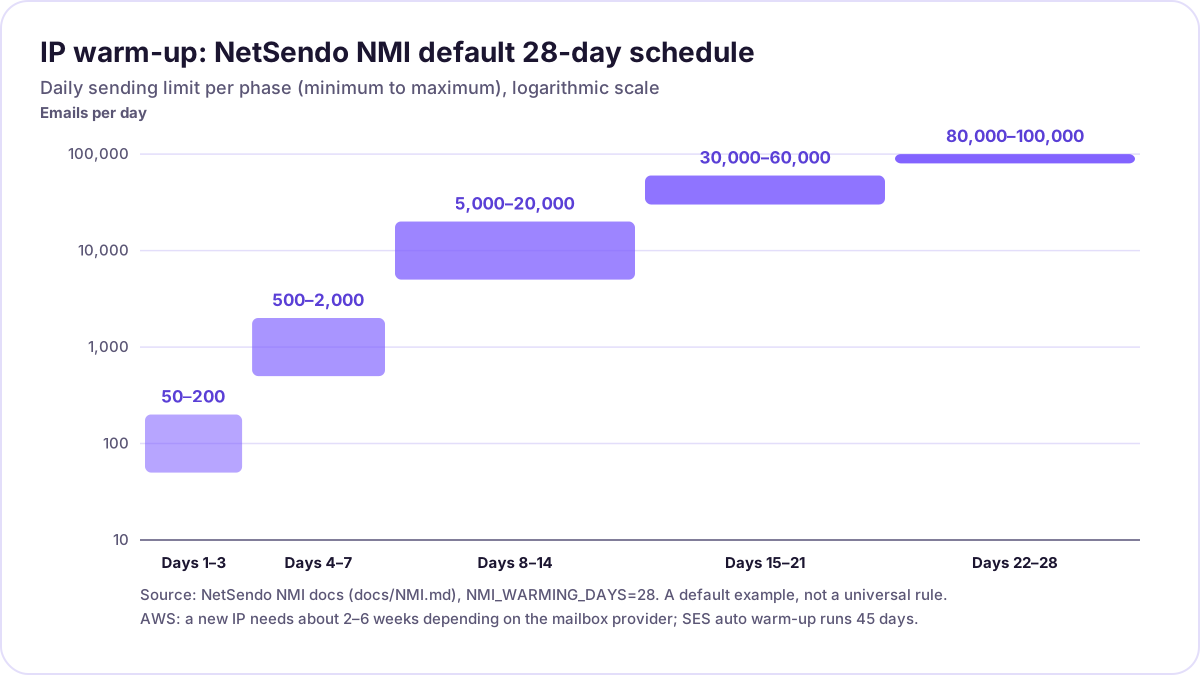 NMI's default warm-up ranges per phase, on a log scale. Each bar spans the minimum and maximum daily limit.
Warm-up rules that matter more than the exact numbers:
- Engaged recipients first. Start with people who opened or clicked recently. AWS says this keeps the complaint rate low.
- Watch bounces daily. If you see blocking or throttling messages (4xx deferrals, "rate limited"), hold or cut the volume for a day.
- Don't spike after warm-up. AWS warns that large, sudden jumps get an IP blocked or throttled. After warm-up, keep sending around 1,000 emails a day to each provider you want to keep a reputation with.
- One IP, one kind of mail. Keep marketing and transactional mail on separate IPs or pools, so a bad campaign can't hurt password resets.
How do I keep my list clean enough to stay under 0.3% complaints?
Mail only people who asked to hear from you, remove addresses that bounce, and stop mailing people who've stopped reading. Complaints come mostly from people who forgot they signed up or never did.
- Use double opt-in for new signups. It stops typos, bots and malicious signups from reaching your list.
- Process bounces automatically. NetSendo reads delivery reports from the bounce (Return-Path) mailbox over IMAP, marks hard bounces, counts soft bounces against a per-list threshold, and skips bounced and unsubscribed contacts at send time (per the changelog).
- Keep a suppression list. Addresses on NetSendo's account-wide suppression list are skipped everywhere, including future imports.
- Sunset inactive contacts. Tag people with no opens or clicks in 6–12 months, send one re-permission email, then stop. NetSendo's MCP server includes
analyze_list_health,verify_list_emailsand aclean_listthat defaults to a dry run. See the MCP guide. - Never import bought or scraped lists. No warm-up schedule survives spam traps.
- Make unsubscribing easier than complaining. Put a visible link in the footer and add one-click headers. People who can't find the link click "Report spam" instead.
Which tools should I use to monitor deliverability?
Use the mailbox providers' own dashboards, read your DMARC reports, and check blacklists. Third-party seed tests are useful, but the providers' own data comes first.
| Tool | What it shows | Notes |
|---|---|---|
| Google Postmaster Tools | Spam rate, reputation, authentication, delivery errors for mail to personal Gmail accounts | Verify your domain with a TXT or CNAME record. Data can be missing on low-volume days |
| Yahoo Complaint Feedback Loop | Complaints from Yahoo users | Yahoo says an active CFL "is needed for all DKIM domains" (best practices) |
| Microsoft SNDS + JMRP | Per-IP data for Outlook.com, plus reports when users mark your mail as junk | For IP owners: request access to the IPs you're responsible for |
DMARC aggregate reports (rua) |
Which IPs send as your domain and whether SPF/DKIM pass and align | Use a report parser. Raw XML is hard to read |
| Blacklist (DNSBL) checks | Whether your IP is listed on Spamhaus, SpamCop, Barracuda and others | NMI checks every 24 hours by default and alerts on a listing |
As of 2026-10-17.
NetSendo also lets you add custom headers per mailbox or per API send, for example Feedback-ID for Postmaster Tools' feedback loop.
How does NetSendo help with deliverability?
NetSendo gives you the controls. Whether mail reaches the inbox still depends on your list and your content. These features are documented in the NMI docs, the changelog and the configuration docs:
- Any sending path. SMTP (Amazon SES, Mailgun, your own server), Gmail API, SendGrid, or NMI. NetSendo itself has no sending limits.
- NMI (NetSendo Mail Infrastructure). An optional Haraka-based MTA started with
docker compose --profile nmi up -d. It adds shared and dedicated IP pools, the 28-day warm-up schedule, automatic 2048-bit DKIM keys with DNS verification and optional rotation, DNSBL monitoring, and reputation thresholds. By default it pauses below a score of 50 and caps bounces at 5% and complaints at 0.1%. - Domain authentication helpers. An SPF generator that checks the lookup limit, a DMARC generator and wizard (none, quarantine, reject), and domain status checks.
- Bounce handling and suppression. IMAP bounce processing, soft-bounce thresholds, list or global bounce scope, and an account-wide suppression list.
- One-click unsubscribe. Automatic RFC 8058 headers are in the next release (see above).
- Custom headers per account, list, mailbox or message.
The licence terms are on the pricing page. SILVER is a free licence for your own business, and you still pay for the server and sending. NetSendo is source-available, not open source. Here's the difference.
Deliverability checklist for self-hosted senders
- Send from your own domain, never a free-mail address. Use a subdomain such as
news.example.comif you want to keep marketing reputation separate. - Publish one SPF record per sending name and keep it under 10 lookups.
- Sign with DKIM (2048-bit) on a domain aligned with your From address.
- Use a custom MAIL FROM (bounce) subdomain so SPF can align too.
- Publish DMARC
p=nonewith aruaaddress and read the reports weekly. - On your own IPs, set PTR to a meaningful hostname that resolves back to the IP, and enable TLS.
- Add
List-Unsubscribe+List-Unsubscribe-Postand process unsubscribes within 48 hours. - Start on a shared IP. Move to a dedicated IP only with steady, high volume.
- Warm up new IPs over at least 2–4 weeks, engaged recipients first.
- Use double opt-in, automatic bounce processing and a suppression list.
- Sunset contacts with no engagement in 6–12 months.
- Register Postmaster Tools, Yahoo CFL and SNDS/JMRP. Keep the spam rate under 0.10%.
- Monitor blacklists and pause sending when bounce or complaint rates spike.
- Once the DMARC reports are clean, move to
quarantine, thenreject.
Moving from a SaaS tool? The self-hosted Mailchimp alternative guide covers migration. Mailboxes and environment variables are in the configuration docs.
Frequently asked questions
What are Gmail's bulk sender requirements?
Is DMARC p=none enough in 2026?
Do I need a dedicated IP to send from a self-hosted platform?
How long does IP warm-up take?
What is one-click unsubscribe (RFC 8058)?
What happens if I don't meet Outlook's requirements?
Does NetSendo guarantee inbox placement?
Try NetSendo on your own server
Self-hosted email & SMS marketing with a free Silver license. Install with Docker Compose in minutes.
Sources
- Google: Email sender guidelines · checked 2026-10-17
- Google: Email sender guidelines FAQ · checked 2026-10-17
- Google: Set up Postmaster Tools · checked 2026-10-17
- Yahoo Sender Hub: Sender best practices · checked 2026-10-17
- Microsoft Tech Community: Outlook's new requirements for high-volume senders (2 Apr 2025, updated 29 Apr 2025) · checked 2026-10-17
- Microsoft: Smart Network Data Services (SNDS) · checked 2026-10-17
- RFC 8058: Signaling One-Click Functionality for List Email Headers · checked 2026-10-17
- RFC 7208: Sender Policy Framework (SPF) · checked 2026-10-17
- dmarc.org: Overview · checked 2026-10-17
- Amazon SES: Dedicated IP addresses · checked 2026-10-17
- Amazon SES: Warming up dedicated IP addresses (standard) · checked 2026-10-17
- Amazon SES: Using a custom MAIL FROM domain · checked 2026-10-17
- Amazon SES pricing · checked 2026-10-17
- NetSendo: NMI (NetSendo Mail Infrastructure) docs · checked 2026-10-17
- NetSendo changelog · checked 2026-10-17