

Self-hosted Mailchimp alternative: costs, features, migration
Updated: · 10 min read · NetSendo Team
Why do people look for a self-hosted Mailchimp alternative?
Most people leave Mailchimp because the bill grows with the contact count, not with what they send. A self-hosted platform changes the cost model: you pay for a server and for sending, and the number of contacts stops being the price driver. The other reasons come up less often but carry weight: the shrunken free plan, and wanting subscriber data on infrastructure you choose.
Mailchimp prices at 10k, 50k and 100k contacts
Here is what Mailchimp's pricing page showed for the contact tiers that cover each list size:
| Contacts | Essentials (USD/month) | Standard (USD/month) | Premium (USD/month) |
|---|---|---|---|
| 10,000 (tier 5,001–10,000) | $110 | $135 | $350 |
| 50,000 (tier 40,001–50,000) | $385 | $450 | $815 |
| 100,000 (tier 75,001–100,000) | not available ("Contact limit exceeded") | $800 | $1,025 |
| Monthly email sends included | 10× contacts | 12× contacts | 15× contacts |
As of 2026-10-16, USD, monthly. List prices before Mailchimp's promotion of 15% off the first 12 months for 10,000+ contacts. Overages apply above the contact or send limit.
Contact-based billing counts people you can't email
Mailchimp's plans are priced by contacts, and its help page on contact statuses says subscribed, unsubscribed and non-subscribed contacts all count toward the monthly contact limit. Only cleaned and archived contacts don't. If you don't archive unsubscribes regularly, you keep paying for people who opted out.
The free plan is now very small
Mailchimp Free is limited to 250 contacts and a "Max of 500/mo or 250/day" emails. Sending pauses when you exceed either limit. That works for a test list, not for a newsletter that is growing.
Data location
Mailchimp's GDPR page states that its servers are located in the US. To be fair, the same page says Mailchimp is certified under the EU-U.S. Data Privacy Framework and includes the EU Standard Contractual Clauses in its Data Processing Addendum. For many EU businesses that is enough. Others, often for internal policy or customer contracts, prefer subscriber data on a server they choose, in a country they choose.
What changes when you self-host?
Self-hosting means two jobs move to you: running the application server and choosing the sending provider. Mailchimp does both behind one price. With a self-hosted tool you pick a VPS or your own hardware, install the app (NetSendo runs in Docker), and connect it to something that actually delivers email.
| Responsibility | Mailchimp | Self-hosted (e.g. NetSendo) |
|---|---|---|
| Application hosting, updates, backups | Mailchimp | You (Docker, docker compose pull to update) |
| Sending infrastructure | Mailchimp's infrastructure | Your choice: Amazon SES, Mailgun, SendGrid, Gmail API, any SMTP, or NMI with your own dedicated IPs |
| Domain authentication (SPF, DKIM, DMARC) | Set up inside Mailchimp | You set the DNS records for your provider |
| Bounces and complaints | Handled automatically | Handled by the app, fed by your provider's bounce notifications |
| Where subscriber data lives | Mailchimp's US servers | The server and region you pick |
| Price driver | Number of contacts | Server size and emails sent |
NetSendo itself puts no sending limits on you; volume depends on the provider you connect. The flip side is that deliverability is now your job. Our deliverability guide for self-hosted senders covers the details.
How much does a self-hosted setup cost compared with Mailchimp?
At 50,000 and 100,000 contacts, the infrastructure for a self-hosted setup costs a fraction of Mailchimp Standard. At 10,000 contacts the gap is small, and adding a paid licence can erase it. The figures below are an illustrative calculation, not a benchmark.
Assumptions:
- every contact gets 4 emails a month (well within Mailchimp Standard's 12× allowance);
- sending through Amazon SES at $0.10 per 1,000 emails (AWS);
- a DigitalOcean Basic droplet: 4 GiB for 10k and 50k contacts ($24), 8 GiB for 100k ($48) (DigitalOcean);
- a dedicated SES IP at $24.95/month from 50k contacts up;
- NetSendo SILVER (free licence) or GOLD ($97/month, per the pricing page).
| Contacts | Emails/month | Mailchimp Standard | Self-hosted, NetSendo SILVER | Self-hosted, NetSendo GOLD |
|---|---|---|---|---|
| 10,000 | 40,000 | $135 | $28 ($24 server + $4 SES) | $125 |
| 50,000 | 200,000 | $450 | $68.95 ($24 + $20 + $24.95 IP) | $165.95 |
| 100,000 | 400,000 | $800 | $112.95 ($48 + $40 + $24.95 IP) | $209.95 |
USD per month, prices checked 2026-10-16. Excludes your admin time, backups storage, monitoring, and AWS free-tier credits. NetSendo does not publish an official sizing table, so server sizes are assumptions; measure your own load.
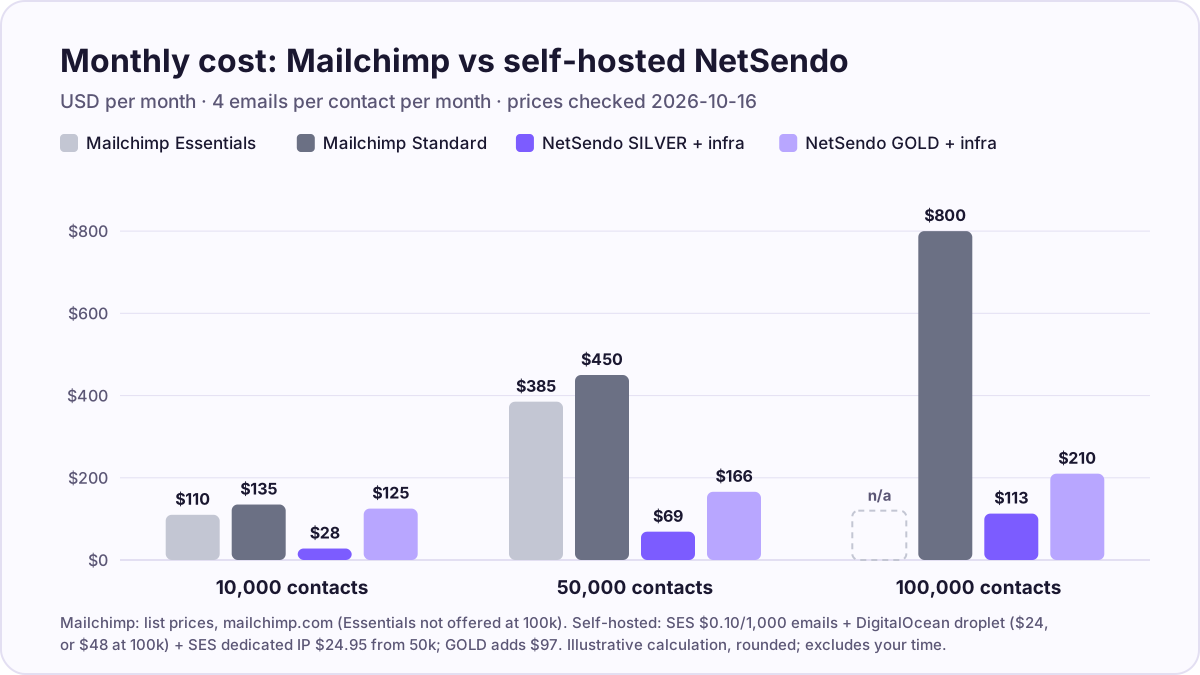 Monthly cost at three list sizes. Mailchimp list prices from mailchimp.com (2026-10-16); self-hosted figures are the calculation above.
The honest reading: if you have 10,000 contacts and need GOLD features, self-hosting will not save you money against Mailchimp Essentials ($110). It pays off when the list is large, or when you're happy on the free licence. For the full method and more vendors, see what email marketing really costs at 10k, 50k and 100k contacts.
Mailchimp features vs NetSendo: what maps, what doesn't
Most everyday Mailchimp work has a direct counterpart in NetSendo. Landing pages and the size of the app ecosystem are the clear gaps. The table only lists NetSendo features documented in its README, the pricing page or the API documentation.
| Mailchimp | NetSendo | Notes |
|---|---|---|
| Campaigns (regular emails) | Email campaigns with an MJML editor and drag-and-drop template builder | Scheduling, placeholders for personalisation |
| Customer Journeys | Automations & funnels | Included in SILVER. Multi-step scenarios and workflows |
| Audience | Contact lists (email or SMS), groups, tags, custom fields | Several lists per account; a contact can belong to many lists |
| Segments, tags, groups | Tags, groups, list membership and custom fields | Rebuild Mailchimp segments as tags or lists during import; test any complex segment logic in the demo first |
| Signup forms, double opt-in | Subscription forms; double opt-in set per list; the NetSendo for WordPress plugin adds Gutenberg form blocks | |
| Landing pages, website builder | Gap. No general landing-page builder is listed | Webinars and sales funnels (Stripe, Polar, Shopify) exist; host other landing pages on your own site |
| A/B testing | A/B testing in campaigns | GOLD only |
| SMS (paid add-on on Essentials and higher, per country) | Built-in SMS through your own provider: Twilio, Vonage, MessageBird, Plivo, SMSAPI | You pay the SMS provider directly |
| Transactional email (separate Mailchimp product) | Single and batch email sending via the REST API | |
| Reports | Open, click and conversion statistics | |
| Integrations marketplace | WordPress, WooCommerce, Shopify, Stripe, Polar, n8n node, REST API, signed webhooks, MCP server | Mailchimp's ecosystem is much larger; check your must-have integrations first |
| Content generation with AI | AI suite with OpenAI, Claude, Gemini, Grok, OpenRouter or local models via Ollama | SILVER: up to 3 AI campaigns; GOLD: unlimited and local LLM |
| — | CRM with sales pipeline, live webinars, auto-webinars (GOLD) | Extras you may or may not need |
Mailchimp's SMS details come from its SMS help page, which describes SMS as an add-on for "Essentials plan or higher".
If you work with AI assistants, NetSendo's MCP server lets Claude, Cursor or VS Code manage lists and campaigns on your own instance. See self-hosted MCP server for email marketing and the agents page.
How do you migrate from Mailchimp to a self-hosted platform?
Plan for a week or two of overlap: set up the new stack, move contacts, authenticate the domain, warm up, then switch off Mailchimp. Rushing the warm-up is the most common mistake.
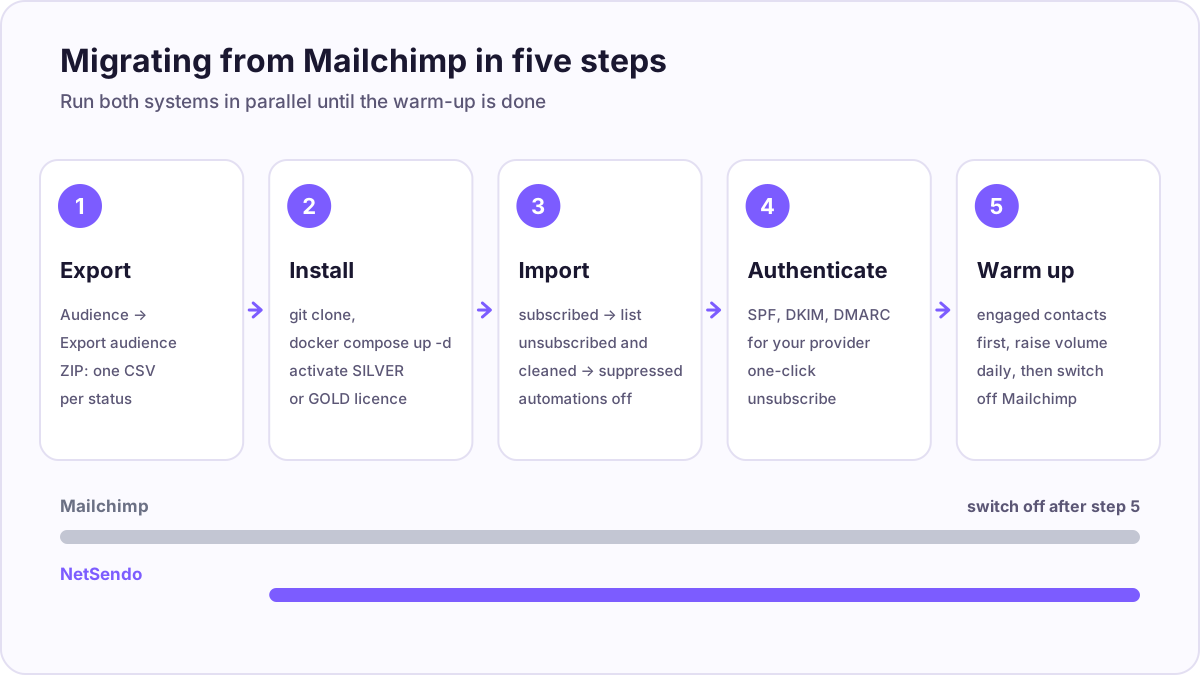 The five migration steps. Keep Mailchimp running until step 5 is complete.
1. Export your Mailchimp audience
In Mailchimp go to Audience → Export audience → Export CSV. Only Owners and Admins can export. Per Mailchimp's help, you get a ZIP with a separate CSV for each status: subscribed, unsubscribed, non-subscribed and cleaned. Exports stay available for 30 days. Also note your tags, groups and signup-form fields so you can recreate them as tags and custom fields.
2. Install the self-hosted platform
For NetSendo: git clone https://github.com/NetSendo/NetSendo.git, cp .env.example .env, docker compose up -d, then activate a SILVER or GOLD licence in the app. The quickstart has the full steps. Put a reverse proxy (nginx or Caddy) with HTTPS in front, and connect your sending provider as a mailbox.
3. Import contacts, and suppress the rest
- Subscribed CSV → import into a list. The NetSendo import accepts CSV, TSV or JSON, detects the delimiter and header row, and lets you map columns to fields, including custom fields. Through the API it's
POST /api/v1/lists/{id}/import, up to 5,000 rows per request, with adry_runpreview. - Turn off
trigger_automationsfor the migration import. It defaults totrue, which would send your welcome sequence to people who subscribed years ago. - Unsubscribed and cleaned CSVs → add them to the account-wide suppression list. Suppressed addresses are skipped on every later import, so an old CSV can't bring them back.
- Non-subscribed contacts (for example, buyers who never opted in) → leave them out of marketing lists unless you have a documented legal basis.
- Use the
tagsoption to keep the source visible, e.g.mailchimp-import.
4. Authenticate your sending domain
Set up SPF and DKIM for your new provider, and publish a DMARC record. These are no longer optional at volume: Google's sender guidelines require SPF, DKIM, DMARC, a one-click unsubscribe and a spam rate below 0.30% for senders of 5,000+ messages a day to Gmail, and Microsoft requires SPF, DKIM and DMARC for domains sending more than 5,000 emails a day to Outlook.com. Leave Mailchimp's authentication records in place until you have stopped sending from Mailchimp.
5. Warm up, then switch off Mailchimp
On a new dedicated IP, start with your most engaged subscribers and raise volume day by day. A moderate schedule such as Braze's starts at 50 emails on day 1 and reaches 1,000,000 by day 21. Watch bounces and complaints. Repoint your website forms to NetSendo, then downgrade or close the Mailchimp account. Mailchimp bills on the peak contact total of each billing period, so deleting or archiving contacts mid-cycle doesn't lower the current bill; time the switch near a renewal.
When should you stay on Mailchimp?
Stay on Mailchimp, or pick another hosted tool, if any of these apply:
- Nobody on your team will run a server. Self-hosting means updates, backups, monitoring and DNS. If that sounds like a burden, the saving isn't worth it.
- You rely on Mailchimp's landing pages, website builder or a specific marketplace integration that NetSendo doesn't have.
- Your list is small and stable. At a few thousand contacts, a hosted plan costs little, and some free plans are generous (see below).
- You want one vendor responsible for deliverability. On a hosted platform, IP reputation is the vendor's problem. Self-hosted, it is yours.
Hosted alternatives worth a look
If you mainly want a lower bill and not your own server, compare hosted tools first:
- MailerLite: Comfort costs $89/month for 10,000 subscribers and $439/month for 100,000, billed monthly; the free plan covers 250 subscribers and 2,500 emails a month (pricing).
- Brevo: priced by emails sent, not contacts. The Standard plan's 40,000-emails tier came to about €69/month (geo-priced in EUR) (pricing).
- Kit: the free plan covers up to 10,000 subscribers (pricing).
Prices as of 2026-10-16.
If you do want to self-host but aren't sure NetSendo fits, our comparison of the best self-hosted email marketing software covers listmonk, Mautic, Sendy and others. Unlike listmonk and Mautic, NetSendo is not open source: it is source-available under the NetSendo EULA. See Is NetSendo open source? for what that means.
Bottom line
A self-hosted Mailchimp alternative replaces a per-contact bill with a server bill and a sending bill. At large lists that is a big saving: in our calculation, $113 instead of $800 a month at 100,000 contacts. In exchange, you run the server, own the deliverability, and lose Mailchimp's landing pages and integration catalogue. If that trade works for you, start with the free SILVER licence via the quickstart and run both systems side by side until the new one has earned your trust.
Frequently asked questions
Is there a self-hosted version of Mailchimp?
How much does Mailchimp cost for 50,000 contacts?
Is a self-hosted Mailchimp alternative actually cheaper?
Can I import my Mailchimp audience into NetSendo?
Do I need my own mail server to self-host email marketing?
Will my emails land in the inbox after leaving Mailchimp?
Is NetSendo free?
Try NetSendo on your own server
Self-hosted email & SMS marketing with a free Silver license. Install with Docker Compose in minutes.
Sources
- Mailchimp marketing pricing (USD) · checked 2026-10-16
- Mailchimp: About your contacts (which statuses count toward the limit) · checked 2026-10-17
- Mailchimp: Archive inactive contacts (peak contact billing) · checked 2026-10-17
- Mailchimp: View or export your contacts · checked 2026-10-17
- Mailchimp: About SMS marketing · checked 2026-10-17
- Mailchimp GDPR page · checked 2026-10-16
- MailerLite pricing · checked 2026-10-16
- Brevo pricing · checked 2026-10-16
- Kit pricing · checked 2026-10-16
- Amazon SES pricing · checked 2026-10-16
- DigitalOcean droplet pricing · checked 2026-10-16
- Google: Email sender guidelines · checked 2026-10-16
- Microsoft: Outlook requirements for high-volume senders · checked 2026-10-16
- Braze: IP warming schedule · checked 2026-10-16
- NetSendo README (features, licence plans) · checked 2026-10-17
- NetSendo API documentation (import, suppressions, list hygiene) · checked 2026-10-17