
Webinar email funnel: live and evergreen webinars, step by step
Updated: · 15 min read · NetSendo Team
What is a webinar email funnel?
A webinar email funnel is the set of emails (and optionally SMS) that takes a person from signing up for a webinar to buying, or deciding not to buy, after it. The webinar is the centre, but most of the work happens in the messages around it: they get people to show up, bring back the ones who didn't, and give attendees a clear next step.
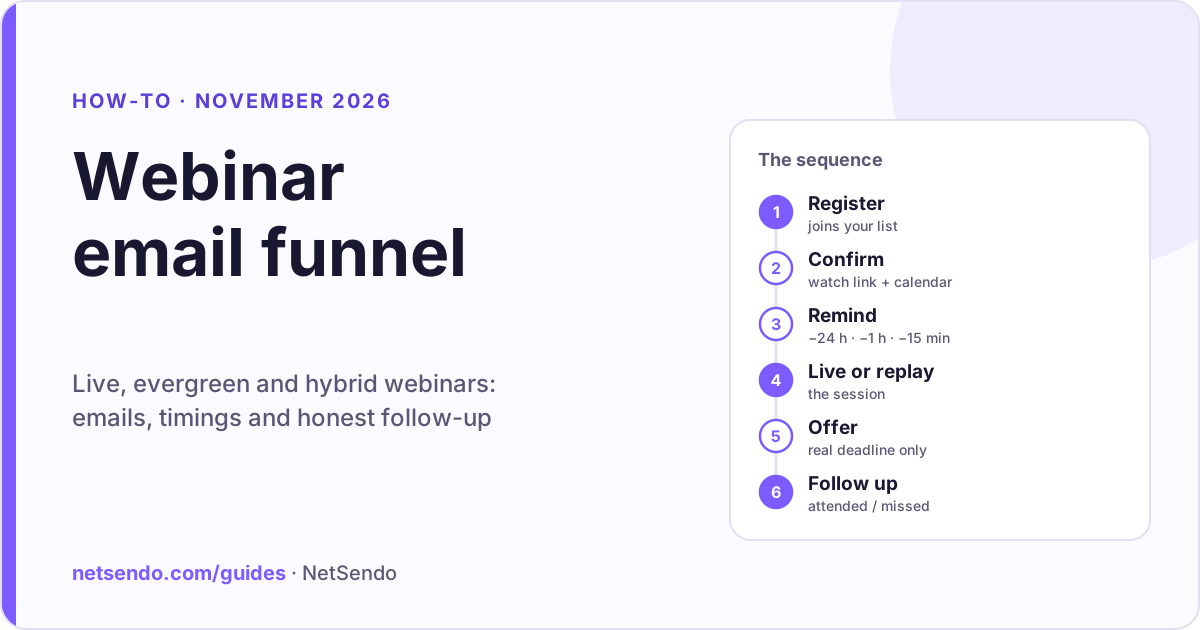
Every webinar funnel has the same six stages:
- Registration: a landing page with a form. The person joins a list.
- Confirmation: an immediate email with the date, time zone, a personal watch link and an add-to-calendar link.
- Reminders: a few short emails (and maybe one SMS) before the start.
- Live session or replay: the webinar itself, live or recorded.
- Offer: the product, call or next step you present at the end.
- Follow-up: different emails for people who attended, people who missed it, and people who already bought.
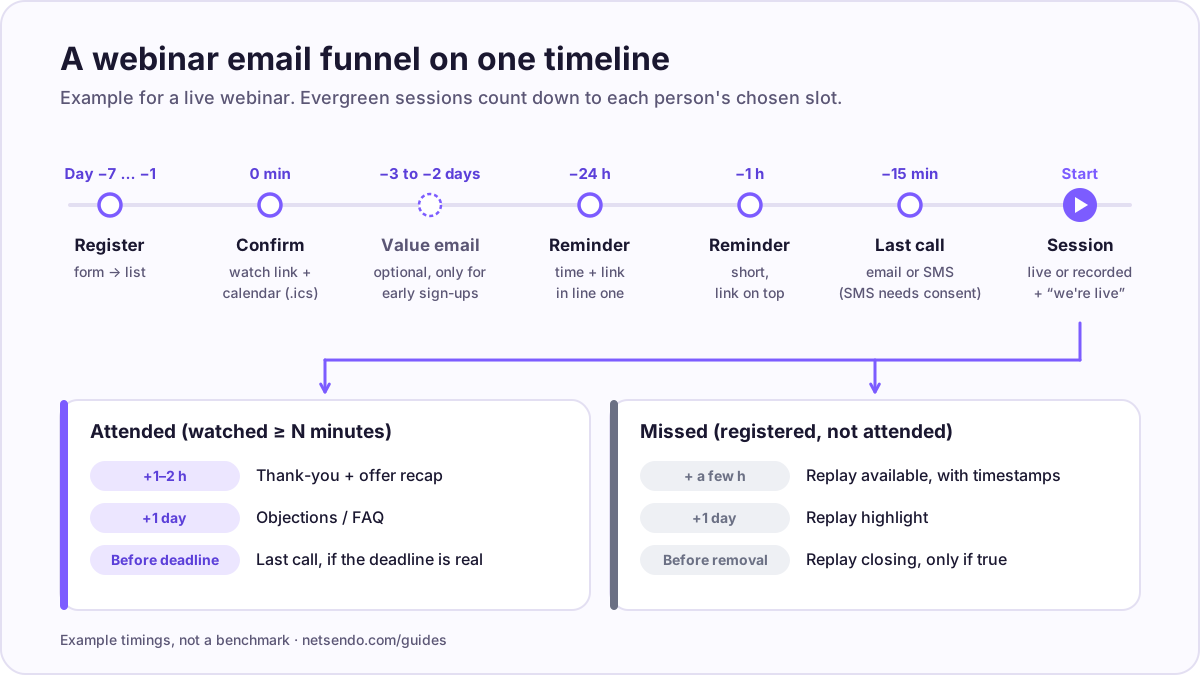 The six stages on a timeline. Timings are an example, not a benchmark.
The funnel shape is the same whether you run a live webinar on Thursday at 6 pm or an automated one that starts every hour. What differs is the clock: for a live webinar every registrant shares one start time; for an evergreen webinar each person's reminders count down to the session slot they picked.
Which emails should a webinar funnel send, and when?
Send fewer messages than you think, and make each one do one job. The template below is a working example for a live webinar with registrations open about a week ahead. Adjust it to your audience. It is not a tested benchmark.
Before the webinar
| # | Message | When (example) | Job | What goes in it |
|---|---|---|---|---|
| 1 | Confirmation | Immediately | Lock in the date | Date and time in the registrant's time zone, personal watch link, add-to-calendar (Google, Outlook, .ics), one sentence on what they will learn |
| 2 | Value email (optional) | 2–3 days before, only if they registered early | Build intent | One useful idea from the webinar, plus "reply with the question you want answered" |
| 3 | Reminder | 24 hours before | Plan the time | Time, link, "add to calendar" again, what to have ready |
| 4 | Reminder | 1 hour before | Get them to the screen | Short. Link at the top |
| 5 | Last call (email or SMS) | ~15 minutes before | Final nudge | One line and the link |
| 6 | "We're live" | At the start | Catch late joiners | "We just started", link |
Write the reminders so they still work if someone reads only the first line: the time and the link belong at the top, not under a paragraph of copy.
After the webinar: split by behaviour
After the session, attendees and no-shows need different messages. Sending everyone the same "thanks for joining" email tells the people who missed it that you aren't paying attention.
| Segment | Message | When (example) | What goes in it |
|---|---|---|---|
| Attended (watched at least N minutes) | Thank-you + offer recap | 1–2 hours after | Key points, the offer, the link, the real deadline if there is one |
| Attended | Objections / FAQ | Next day | Answers to questions from the chat, a case or demo |
| Attended | Last call | A few hours before a real deadline | Short reminder; skip it if there is no deadline |
| Missed | Replay available | A few hours after | Replay link, the 2–3 timestamps worth watching, how long the replay stays up |
| Missed | Replay highlight | Next day | One strong moment from the session, link to that point |
| Missed | Replay closing | Before the replay is removed | Only if you really remove it |
| Bought | Exit the sales sequence | As soon as they buy | Move them to onboarding. Never send a buyer "last chance" emails |
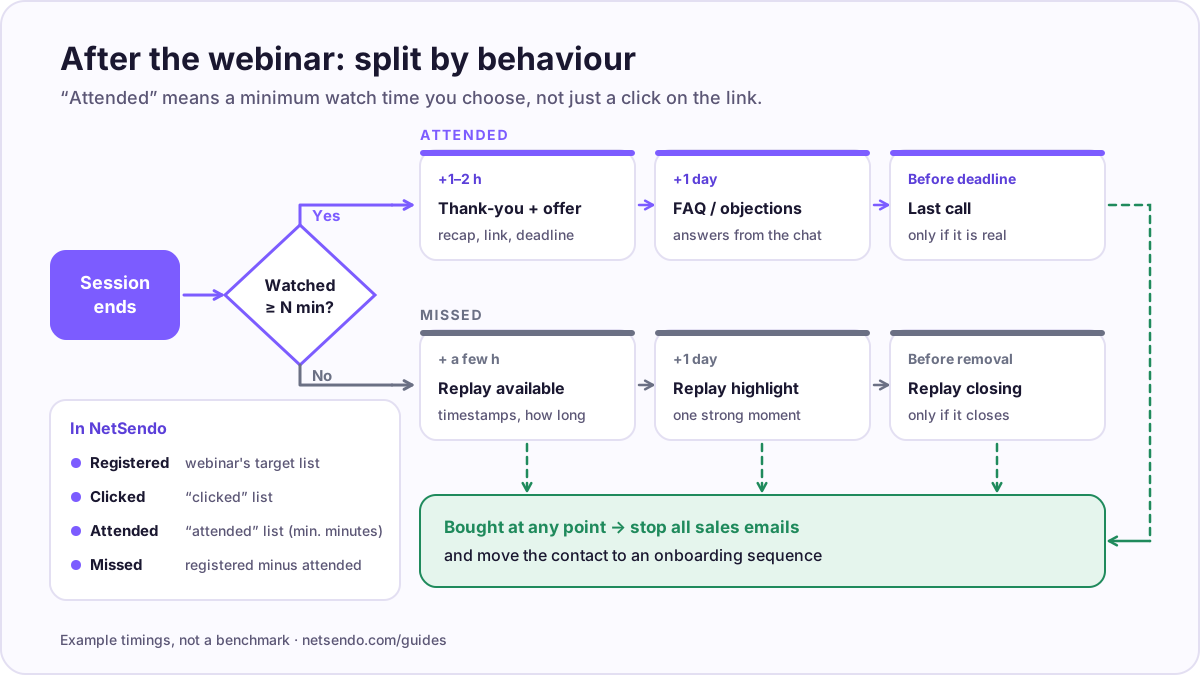 After the session, the sequence splits by behaviour. "Attended" means a minimum watch time you choose, not just a click.
Two rules keep this honest. Deadlines must be real: if the offer or the replay expires, it actually expires. A countdown that resets for every visitor is a fake deadline. Define "attended" by watch time, not by a click on the link: someone who left after two minutes belongs in the replay branch, not the offer branch.
For automated (evergreen) webinars
The same messages work, with two changes. Every timing is relative to the session slot the person chose, not to a fixed date. And if you offer "just-in-time" sessions that start within minutes, skip the reminders entirely: the confirmation and a "starting now" message are enough.
Where SMS fits
SMS is useful for one thing in a webinar funnel: the last-minute reminder. Send it only to people who entered a phone number and gave explicit consent to receive SMS (rules differ by country), and keep it to one or two messages per webinar. Email carries everything else, including the calendar invite.
Reminder emails go to people who just signed up, so they usually get good engagement. That only helps if the domain is set up properly. Check SPF, DKIM and DMARC before a big launch; our deliverability guide for self-hosted senders walks through it.
Live, automated (evergreen) or hybrid: which should you run?
Run your first webinars live: you learn which questions people ask and which part of the pitch loses them. Turn a session that works into an automated webinar once the content is stable. Choose hybrid when you want a recorded presentation and you or a colleague can still be in the chat to answer questions and handle sales.
| Live | Automated (evergreen) | Hybrid | |
|---|---|---|---|
| Video | Streamed in real time | Pre-recorded, played at scheduled slots | Pre-recorded presentation |
| Chat | Real people, real time | Optional imported or scripted messages, disclosed | Real chat, moderated live by you |
| Your time per session | Full session | None after setup | Chat time only |
| Session times | One date | Recurring, fixed dates, on-demand, just-in-time | Usually one date |
| Best for | New topics, launches, Q&A | Proven presentations, continuous lead flow | Sales webinars with personal follow-up |
| Main risk | No-shows, live mistakes | Feels fake if presented as live | Promising "live" when only the chat is live |
Is simulated chat ethical? How to disclose an automated webinar
Simulated chat is fine when it is real and labelled. It becomes a problem when it invents engagement to make people buy. Most webinar tools that offer automated sessions also offer some form of scripted chat, viewer counters or reactions, so the decision is yours, not the tool's.
The legal direction is clear. In the EU, the Unfair Commercial Practices Directive, as amended by Directive 2019/2161, lists among practices that are always unfair "submitting or commissioning another legal or natural person to submit false consumer reviews or endorsements" (Annex I, point 23c). In the US, the FTC's 2024 final rule bans fake testimonials, including AI-generated ones, and buying fake indicators of social-media influence such as bot followers or views. A scripted "testimonial" in a sales webinar chat, or an inflated viewer counter, is close to both. This is not legal advice; check the rules in your market.
What we recommend:
- Say the presentation is recorded. On the registration page and at the start of the video: "This is a recorded presentation. Questions in the chat are answered by email within 24 hours" (or "by our team live", if that is true for a hybrid session).
- Use real chat only. Importing messages from an earlier live session is fine if they are real and you say so. Don't write comments, questions or testimonials and present them as coming from viewers.
- Don't fake the audience. Leave artificial viewer counts off. If a counter shows people, it should show real people.
- Use real deadlines and real scarcity. If an offer ends, it ends for that person.
- Answer every question. Collect questions from automated sessions and reply by email. That is often the best follow-up in the whole funnel.
People notice when a "live" webinar is not live, and the damage lands on your list: complaints and unsubscribes after the session hurt deliverability for every email you send afterwards.
Separate webinar tool plus email tool, or all-in-one?
Both work. With two tools, registration and attendance data have to flow from the webinar tool into your email tool before the follow-up can split into attended and missed. With an all-in-one, the segments are already where the emails are. The trade-off is depth: dedicated webinar platforms usually have stronger live production, larger audiences and more enterprise integrations.
| Tool | Type | Automated webinars | Price (as listed) |
|---|---|---|---|
| WebinarJam | Live webinar platform | Via EverWebinar, included from the Basic plan | Starter $49/month (100 attendees, 1 hour max); Basic $99/month or $79/month billed annually (500 attendees, 2 hours) |
| EverWebinar | Automated webinar platform | Yes: automated, hybrid and just-in-time sessions, "live chat simulator", email and optional SMS reminders | $199/month month-to-month; $99/month billed annually ($1,188 upfront) |
| Zoom Webinars | Webinar platform | Pre-recorded sessions ("simulive") on Webinars Plus and Events, not on the base Webinars plan | Webinars from $89/month ($66.67/month billed annually); Webinars Plus from $99/month ($82.50 billed annually); capacity depends on the tier you pick |
| Livestorm | Webinar platform | On-demand events and automation that can play a video | Pro: €2.50 per attendee in a yearly pack of credits; up to 3,000 live attendees per event; integrations such as Brevo and Marketo are Enterprise-only |
| GetResponse | Email platform with webinars | On-demand webinars on Creator and Enterprise | Creator from €62/month at 1,000 contacts (€50.84 billed yearly; geo-priced in EUR); 100 webinar attendees |
| NetSendo | Self-hosted email platform with webinars | Auto-webinars, scenario builder and hybrid on GOLD | SILVER free licence (live webinars via YouTube); GOLD $97/month (pricing); you pay for the server and sending |
Prices as of 2026-10-17, from each vendor's pricing page, in the currency served. WebinarJam's page uses "$" without naming the currency. Check current prices before you buy.
Choose a dedicated webinar platform if you run large interactive live events with several panelists, need breakout rooms or ticketed multi-session events, or must plug into Salesforce or Marketo. Zoom and Livestorm are built for that, and NetSendo isn't.
Choose an all-in-one if most of your webinars are marketing webinars for your own list, you want the attended/missed split without integration work, and you would rather not pay for two subscriptions. If you also want subscriber data on your own server, a self-hosted platform covers that; our overview of the best self-hosted email marketing software compares the options.
How does a webinar funnel work in NetSendo?
In NetSendo the webinar is part of the email platform: registration puts people on a list, the module sends its own confirmation and reminder emails through your mailbox, and attendance and watch time feed lists and tags you can use in follow-up campaigns, automations and funnels. Everything below comes from the webinars page, the pricing page, the README and the CHANGELOG.
Which webinar types are in SILVER and GOLD?
| Feature | SILVER (free licence) | GOLD ($97/month) |
|---|---|---|
| Live webinars | Yes, via YouTube (per the pricing page) | Yes |
| Auto-webinars (evergreen) + chat scenario builder | No | Yes |
| Hybrid webinars | No | Yes |
| Email and SMS marketing, automations and funnels | Yes | Yes |
| A/B testing in campaigns | No | Yes |
Per the pricing page, checked 2026-11-07.
The webinars page also mentions streaming "via YouTube Live or any RTMP provider", and the CHANGELOG adds Vimeo as a video source for live, auto and hybrid webinars (2.1.0). The pricing page lists only YouTube for SILVER, so test your provider in the demo first.
Registration and thank-you pages
Each webinar has a public registration page. Since version 2.1.2 (September 2026) a visual page builder lays out the registration and thank-you pages from blocks: a registration form with optional first name, last name, phone and time zone fields, a session picker for auto-webinars, countdown, speaker bio, testimonials, FAQ, video and a Calendly booking block. Page copy can use tokens such as webinar_name, webinar_date, first_name and watch_url. Registrants see the session time in their own time zone.
A separate public thank-you URL can serve as the redirect target after a purchase.
The built-in emails
The webinar module sends its own messages: a registration confirmation (with Google, Outlook and .ics calendar links since 2.1.0), reminders 24 hours, 1 hour and 15 minutes before the start, a "started" email and a "replay available" email. They go out through your NetSendo mailbox (the target list's mailbox first, then your default), so your normal sending provider and domain authentication apply. That covers messages 1, 3, 4, 5 and 6 from the table above, plus the replay email.
To invite your existing list, a campaign can link to a webinar with the [[webinar_register_link]] and [[webinar_watch_link]] placeholders. With auto-registration enabled, a click on the signed link registers the subscriber and takes them to the watch page, with no form to fill in.
Lists and tags for the attended and missed branches
Registration adds the person to the webinar's target list, which also starts that list's autoresponder sequence. That's where you put the optional value email. In the webinar settings you can name:
- a "clicked" list for people who opened the watch page;
- an "attended" list for people who watched at least a minimum number of minutes you set.
Watch time is also tracked for recordings (native video and Vimeo), and the webinars page describes tagging by watch time and segmentation into Registered, Attended and Missed. If your version doesn't create a missed segment for you, build it as "registered, not on the attended list" and send the replay sequence there. From those lists and tags, your automations and funnels handle the attended branch, the offer and the move to onboarding after a purchase. Funnels can include SMS steps for the last-minute SMS, and contacts need a phone number and SMS consent.
Evergreen scheduling, offers and replay
Auto-webinar schedules can be recurring, fixed dates, on-demand or evergreen, with several sessions a day and "just-in-time" sessions. Late joiners are synced to the session clock rather than starting from zero, and someone who arrives after the recording has ended sees an "ended" screen with a replay link. A separate replay page plays the recording with full controls when replay is allowed.
For the offer, the watch page can show timed CTAs and pinned products with a promotion countdown. Use the countdown only for a deadline that is real. Sales go through NetSendo's sales funnels with Stripe, Polar or Shopify.
Chat, simulated chat and viewer counts
Live sessions have a moderated chat (open, moderated, Q&A only, host only), slow mode and host announcements. For auto-webinars, the GOLD scenario builder lays out chat messages on a timeline and can import messages from a previous live session. The CHANGELOG also lists a "fake viewers" social-proof setting and random message generators. Following the section above, we recommend importing real messages and labelling them, and leaving artificial viewer counts off.
Zoom, Google Meet and Calendly: what they do here
The Zoom and Google Meet integrations create meetings from CRM tasks. They are for one-to-one sales or onboarding calls after the webinar, not for streaming the webinar itself. Calendly fits the follow-up: the thank-you page can embed a Calendly booking widget, and Calendly bookings sync into the CRM, your lists and tags. A "book a call" step after the webinar fits there.
If you work with AI assistants, NetSendo's MCP server lets Claude or Cursor manage the lists, tags, campaigns and funnels around the webinar on your own instance; see the agents page. Webinars themselves are set up in the panel.
How do you measure a webinar funnel?
Track the funnel as a chain of rates, each one tied to the stage you can improve:
| Metric | Formula | What it tells you |
|---|---|---|
| Registration rate | registrations ÷ registration-page visitors | Page and promise |
| Show-up rate | attended ÷ registered | Reminders, timing, calendar links |
| Engagement | average watch time; share who reach the offer | Content and pacing |
| Offer click rate | offer clicks ÷ attended | Offer and presentation |
| Purchase rate | buyers ÷ attended (and ÷ registered) | The whole funnel |
| Replay recovery | replay viewers ÷ missed | Replay emails |
| Revenue per registrant | revenue ÷ registered | Compare webinars and traffic sources |
Two notes. First, decide what "attended" means before you measure, for example "watched at least 10 minutes". NetSendo's attended list uses exactly that kind of threshold. Second, we don't quote "average" show-up or conversion rates here. The public numbers come mostly from vendor reports with different definitions, and they won't tell you much about your own audience. Run three or four sessions, then compare against yourself.
NetSendo's webinar analytics show registrations, page views by device and browser, and video progress. Open and click statistics for the follow-up emails sit in the campaign reports.
Webinar funnel checklist
Before you launch
- One clear promise on the registration page; ask only for the fields you need (phone only if you will send SMS).
- Confirmation email with personal watch link and add-to-calendar links; test it yourself.
- Reminders at 24 hours, 1 hour and ~15 minutes; time and link in the first line.
- SMS only with explicit consent, at most one or two per webinar.
- SPF, DKIM and DMARC set for the sending domain.
- Automated or hybrid? Say "recorded presentation" on the page and in the video.
During
- For live sessions, someone moderating chat and collecting questions.
- Offer shown at a planned time; deadline stated once, clearly.
After
- Attended threshold set (e.g. 10 minutes) and attended list/tag working.
- Attended branch: thank-you + offer, FAQ, last call only if the deadline is real.
- Missed branch: replay with timestamps, replay closing only if it really closes.
- Buyers removed from sales emails and moved to onboarding.
- Every chat question answered by email.
- Metrics recorded per session: registration, show-up, offer clicks, purchases, replay recovery.
Bottom line
A webinar email funnel is a confirmation, a few reminders, the session, and two follow-up branches: one for people who attended and one for people who didn't. Live, evergreen and hybrid webinars all use the same structure. What makes them work is timing, an honest description of the format, and a clean split by watch time. If you want the webinar, the lists and the follow-ups in one self-hosted platform, NetSendo's SILVER licence covers live webinars, and GOLD adds auto-webinars and hybrid sessions. Start with the quickstart or read more on the webinars page. If you are moving from a hosted email tool, our self-hosted Mailchimp alternative guide covers the migration.
Frequently asked questions
How many reminder emails should I send before a webinar?
What is the difference between an automated (evergreen) webinar and a replay?
Is it legal to use simulated chat in an automated webinar?
Should I send SMS reminders for a webinar?
Do I need a separate webinar tool if I already have an email platform?
Which NetSendo plan includes automated webinars?
Are webinars still effective in 2026?
Try NetSendo on your own server
Self-hosted email & SMS marketing with a free Silver license. Install with Docker Compose in minutes.
Sources
- WebinarJam: plans and pricing · checked 2026-10-17
- EverWebinar: pricing · checked 2026-10-17
- Zoom: Webinars and Events pricing · checked 2026-10-17
- Livestorm: pricing · checked 2026-10-17
- GetResponse: pricing · checked 2026-10-17
- FTC: final rule banning fake reviews and testimonials (press release, August 2024) · checked 2026-10-17
- Directive (EU) 2019/2161 amending the Unfair Commercial Practices Directive (Annex I, points 23b and 23c) · checked 2026-10-17
- NetSendo README (features) · checked 2026-10-17
- NetSendo CHANGELOG (webinar module: 1.3.0–2.1.2) · checked 2026-10-17