
Port 25 blocked on your VPS? How to send email anyway
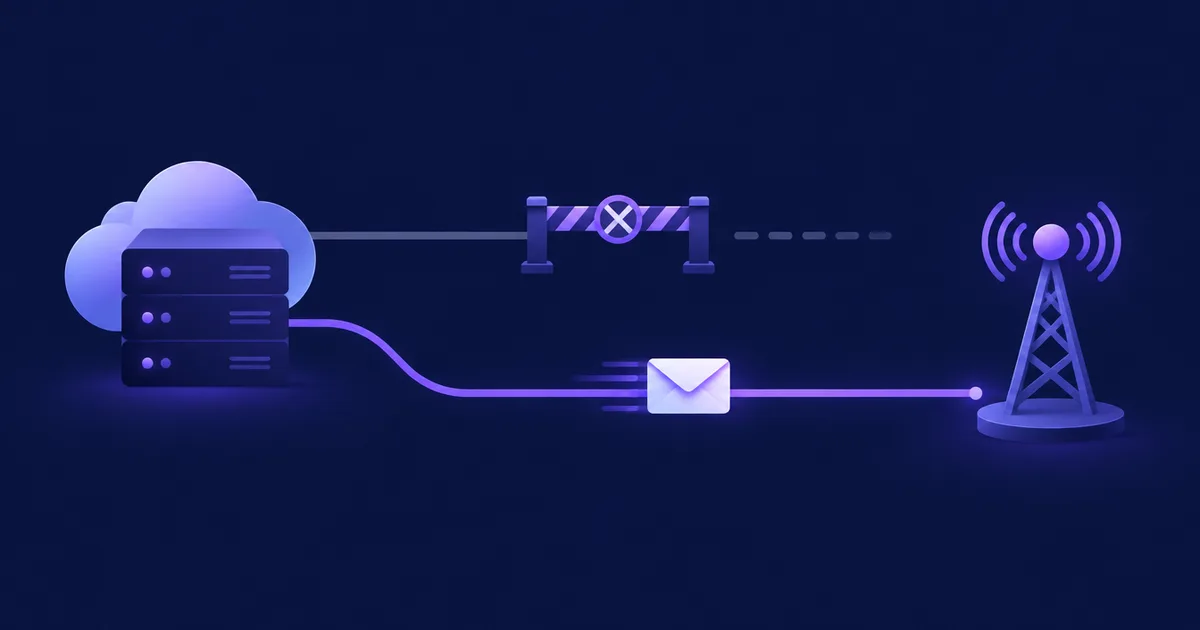
If your VPS can't send email, outbound port 25 is very probably blocked by the cloud provider, and on most clouds that block stays until you ask for it to be lifted or never goes away at all. The fix that works almost everywhere is to stop delivering mail directly from the server and hand it to an authenticated SMTP relay on port 587, 465 or 2525. Port 25 matters only if you run your own MTA that delivers straight to the recipients' mail servers.
nc -vz -w 5 gmail-smtp-in.l.google.com 25: a timeout means outbound port 25 is filtered. DigitalOcean blocks 25, 465 and 587 on every Droplet; Hetzner Cloud blocks 25 and 465 but leaves 587 open; AWS, Google Cloud, Azure (outside enterprise agreements) and Vultr block 25 by default. Send through a relay such as Amazon SES or Mailgun on 587 (or 2525/2587 where 587 is blocked too), or request an unblock if you really need direct delivery. An open port alone does not get you into the inbox: you still need PTR, SPF, DKIM, DMARC and a warmed-up IP.How do I test whether port 25 is blocked on my VPS?
Open a TCP connection from the server to a real mail exchanger on port 25: a 220 greeting means the port is open, a timeout means the provider (or your own firewall) drops the traffic. Run the same test against your relay on 587 and 465 so you know which route is available before you change any configuration.
Step 1: find a mail exchanger to test against
# MX records of a large mailbox provider
dig +short MX gmail.com
# 5 gmail-smtp-in.l.google.com.
# 10 alt1.gmail-smtp-in.l.google.com.
# ...
Step 2: test outbound port 25
# netcat: -v verbose, -z just connect, -w 5 give up after 5 seconds
nc -vz -w 5 gmail-smtp-in.l.google.com 25

# without netcat: read the SMTP greeting with bash's /dev/tcp
timeout 10 bash -c 'exec 3<>/dev/tcp/gmail-smtp-in.l.google.com/25 && head -1 <&3' || echo "port 25 is blocked"
Read the result like this:
| What you see | What it means | Next step |
|---|---|---|
220 mx.google.com ESMTP … | Port 25 is open end to end | Direct delivery is possible; now check PTR and reputation |
Hangs, then timed out | Packets are silently dropped, typical of a provider block | Check the provider policy below and your own egress rules |
Connection refused | Something actively rejects the connection (often a local firewall rule or a proxy) | Check ufw/nftables and any outbound proxy |
Name or service not known | DNS problem, not a port problem | Fix the resolver first |
Step 3: test your relay on the submission ports
Submission ports use TLS, so test them with openssl s_client. Port 587 starts in plain text and upgrades with STARTTLS; port 465 is TLS from the first byte.
# 587 with STARTTLS (Amazon SES, eu-west-1 endpoint as an example)
openssl s_client -starttls smtp -connect email-smtp.eu-west-1.amazonaws.com:587 -crlf -quiet
# expect the certificate chain followed by "250 ..." lines; type QUIT to leave

# 465 with implicit TLS
openssl s_client -connect email-smtp.eu-west-1.amazonaws.com:465 -crlf -quiet

# alternative ports when 587 and 465 are blocked too (e.g. DigitalOcean)
nc -vz -w 5 email-smtp.eu-west-1.amazonaws.com 2587
nc -vz -w 5 smtp.mailgun.org 2525
💡 Tip: Run every test twice, once withnc -4and once withnc -6. Providers sometimes filter IPv4 and IPv6 differently, and your MTA will happily try an AAAA record first.
Which cloud providers block port 25?
Most large clouds block outbound port 25 on new servers by default, and they differ mainly in whether you can get the block lifted. DigitalOcean is the strictest because it also blocks the submission ports 465 and 587; Hetzner Cloud and Vultr review unblock requests case by case; AWS has a request form; Google Cloud lifts the block per project on its own once it considers the project low-risk.
| Provider | Outbound 25 by default | 465 / 587 | Can it be lifted? |
|---|---|---|---|
| DigitalOcean Droplets | ✗ Blocked | ✗ Both blocked, also through Reserved IPs | The docs describe no unblock process and recommend a third-party email service (DigitalOcean) |
| Hetzner Cloud | ✗ Blocked | 465 blocked, ✓ 587 open | ~ After one month and the first paid invoice, via a limit request in the Hetzner Console, case by case (Hetzner) |
| AWS EC2 and Lambda | ✗ Blocked unless the account is allow-listed | ✓ Open | ~ Request form, one request per Region (AWS) |
| Google Cloud Compute Engine | ✗ Blocked to external IPs | ✓ Excluded from the block | ~ Lifted automatically when Google considers the project low-risk; a banner on the VPC networks page shows the state (Google Cloud) |
| Azure VMs | ✓ Open on Enterprise Agreement and MCA-E; ✗ blocked on all other subscription types | ✓ 587 to authenticated relays not restricted | Enterprise Dev/Test: self-service exemption in Diagnose and Solve; other types: use a relay (Microsoft) |
| Vultr | ✗ Blocked on new instances | ✓ Open | ~ Support ticket with use case, SPF/DKIM/rate limits and expected volume; not guaranteed (Vultr) |
As of November 2026, checked against each provider's own documentation on 12 November 2026. Policies change; run the test from the previous section before you rely on this table.
Smaller hosts follow their own rules, and some keep port 25 open on VPS plans. Ask before you buy if direct delivery is a hard requirement, and run the nc test on day one.
Port 25 vs 587 vs 465 vs 2525: what is each one for?
Port 25 is for server-to-server delivery: your MTA connects to the recipient's MX and hands over the message without logging in. Ports 587 and 465 are for submission: an application or mail client logs in to its own provider, which then does the port-25 delivery from its reputable IPs. Port 2525 (and Amazon's 2587/2465) is an unofficial alternative that relays offer for networks that block the standard ports.
Submission is the authenticated hand-off from your app to a mail service (587/465). Relay is that service forwarding mail on your behalf. Delivery is the final SMTP hop to the recipient's MX on port 25. When port 25 is blocked, you keep submission and outsource delivery.
| Port | Purpose | Encryption | Authentication |
|---|---|---|---|
| 25 | MTA to MX delivery (and relays accept it too) | Optional STARTTLS | None towards an MX |
| 587 | Submission to your provider | STARTTLS | Required |
| 465 | Submission with implicit TLS | TLS from the first byte | Required |
| 2525 / 2587 / 2465 | Fallback submission ports offered by some relays | STARTTLS (2525, 2587) or TLS (2465) | Required |
Amazon SES accepts STARTTLS on 25, 587 and 2587 and TLS Wrapper on 465 and 2465 (AWS SES docs); Mailgun accepts 25, 465, 587 and 2525 (Mailgun docs). That is why a Droplet that cannot reach 587 can usually still reach a relay on 2525 or 2587.
What are my options when port 25 is blocked?
You have three realistic options: relay through an email service on a submission port, ask the provider to lift the block, or move direct delivery to a host that allows it. For an application that sends newsletters, transactional mail or notifications, the relay is the right answer in most cases.
Option 1: relay through an ESP on 587, 465 or 2525
Create SMTP credentials at a relay (Amazon SES, Mailgun, SendGrid, Postmark, SMTP2GO or similar), verify your domain there, and point your application at the relay host. A minimal Postfix setup that forwards everything to Amazon SES looks like this:
# /etc/postfix/main.cf (relevant lines)
relayhost = [email-smtp.eu-west-1.amazonaws.com]:587
smtp_sasl_auth_enable = yes
smtp_sasl_password_maps = hash:/etc/postfix/sasl_passwd
smtp_sasl_security_options = noanonymous
smtp_tls_security_level = encrypt

# /etc/postfix/sasl_passwd
[email-smtp.eu-west-1.amazonaws.com]:587 SMTP_USERNAME:SMTP_PASSWORD

# then
sudo postmap /etc/postfix/sasl_passwd
sudo chmod 600 /etc/postfix/sasl_passwd /etc/postfix/sasl_passwd.db
sudo systemctl reload postfix
On DigitalOcean replace :587 with :2587 for SES or use smtp.mailgun.org:2525, because the Droplet cannot reach 587. A full walkthrough for SES, including sandbox exit and DNS records, is in our Amazon SES SMTP setup guide.
✅ Advantages
- Works on every provider in the table, usually within minutes
- The relay's IPs already have a sending history
- Bounces, complaints and suppression are handled for you
❌ Considerations
- Per-message cost and the relay's own quotas
- Another company processes your recipients' addresses, so it belongs in your records of processing
- Shared IPs carry the reputation of other senders
Option 2: request an unblock
Choose this when you run your own MTA on purpose, for example to send from dedicated IPs. The next section shows what to write. Expect a review, account-age requirements and possibly a refusal.
Option 3: deliver from a different host
Keep the application where it is and put only the MTA on a provider or dedicated server that allows port 25, then submit to it on 587 over the network. You take on everything a relay would otherwise do for you: PTR, IP warm-up, blocklist monitoring and bounce handling.
How do I ask the provider to unblock port 25?
Write a short, specific request that shows you send wanted mail, have authentication in place and can stop abuse. Providers review these by hand and reject vague ones, so prepare DNS first: an A record for your sending host name and, where you can set it, a PTR record pointing back to that name.
- Prepare DNS
Create
mail.example.com→ your server IP, set reverse DNS tomail.example.comin the provider panel (AWS: on the Elastic IP; the request form has an optional rDNS field), and publish SPF, DKIM and DMARC for the sending domain. - Check the formal conditions
Hetzner Cloud wants a one-month-old account with a paid first invoice; AWS needs one request per Region; Vultr asks about SPF/DKIM, rate limits and volume.
- Send the request
Use the provider's form or ticket system, not a forum post.
- Re-test
Some providers need a reboot or stop/start for the new policy (Azure says so explicitly for exempted subscriptions).
A request that answers the usual questions:
Subject: Request to allow outbound SMTP (TCP 25) for server 203.0.113.10

We run a self-hosted email platform for our own company (example.com) on this
server. It sends opt-in newsletters and transactional emails (order and account
notifications) to people who subscribed through a double opt-in form.

- Sending host: mail.example.com (A record and PTR set to 203.0.113.10)
- SPF, DKIM and DMARC (p=quarantine) are published for example.com
- Expected volume: about 2,000 messages per day, rate-limited to 300 per hour
- Every message has a one-click unsubscribe link; bounces and complaints are
  suppressed automatically
- Abuse contact: postmaster@example.com

Please remove the outbound port 25 restriction for this server.
Use your real numbers. A vague request is easy to refuse, and the provider can reinstate the block if complaints arrive later.
Why isn't an open port 25 enough to reach the inbox?
Because the receiving server judges the IP, not just the connection: without a matching PTR record, authenticated domains and a sending history, a brand-new cloud IP is either rejected or filtered to spam. Gmail, Yahoo and Microsoft all require authentication from bulk senders, and a forward-confirmed reverse DNS name is part of that picture.
PTR (reverse DNS)
dig +short -x 203.0.113.10        # should return mail.example.com.
dig +short A mail.example.com     # should return 203.0.113.10
# the HELO/EHLO name of your MTA should be the same host name
A generic, provider-assigned PTR name or no PTR at all is a frequent reason for rejections. If you see Gmail's 550-5.7.26 or similar authentication errors, work through our guide to the Gmail 550-5.7.26 error.
IP reputation and warm-up
A new IP has no history, and cloud ranges are often seen with suspicion. Start with low daily volumes to your most engaged recipients and raise them gradually over weeks while watching bounces and complaints. The warm-up plan and the Gmail, Yahoo and Outlook sender requirements side by side are in the deliverability guide for self-hosted senders.
Operational load
Direct delivery also means you handle deferrals (4xx), retries, feedback loops and blocklist checks yourself. If that sounds like more work than the reason you wanted port 25 in the first place, use a relay.
Docker, firewall and IPv6: why tests pass on the host but mail still fails
A successful test on the host does not prove that a container can reach the same port, and the other way round. Containers on a Docker bridge network leave the host through NAT in the FORWARD chain, while host processes use OUTPUT, so egress rules can apply to one and not the other.
- Test from inside the container that actually sends. Many application images have PHP or Python but no
nc; this works in any PHP container:docker compose exec app php -r '$s=@fsockopen("email-smtp.eu-west-1.amazonaws.com",587,$e,$m,5); echo $s ? fgets($s) : "failed: $m\n";' - ufw with
default deny outgoingblocks the host, and rules you add withufw allow out 587/tcpapply to host traffic. Container egress goes through Docker's own chains; restrict it inDOCKER-USERif you need to. - Cloud firewalls (security groups, Hetzner Firewalls, VPC egress rules) come on top of the provider-wide block. Google Cloud, for example, needs an egress allow rule if you added a deny-all egress rule.
- IPv6: Docker's default bridge network is IPv4-only, so containers usually connect over IPv4 even when the host has IPv6. An MTA on the host network, however, may prefer AAAA records; the IPv6 address then needs its own PTR record and the same tests.
- Containers and DNS: if the container cannot resolve the relay host name, the error looks like a network failure. Check with
docker compose exec app getent hosts email-smtp.eu-west-1.amazonaws.com.
Sending from NetSendo when port 25 is blocked
NetSendo sends campaigns through mailboxes you add in the panel, and an SMTP mailbox (host, port, user, password, encryption) connected to a relay such as Amazon SES or Mailgun works on 587, 465 or an alternative port, so a blocked port 25 does not affect it. The variables are described in the configuration reference; NetSendo sets no sending limits of its own, so your volume is whatever the relay allows.
The optional NetSendo MTA (NMI, a Haraka container started with docker compose --profile nmi up -d, a GOLD feature) is different: it delivers straight to the recipients' servers, so it needs outbound port 25 and a PTR record for every sending IP. Where the port is blocked, the MTA accepts mail and cannot deliver it, and docker logs netsendo-mta shows connection timeouts. Since version 2.9.0, Settings → Mail Infrastructure → Configure Providers explains each IP provider's port 25 rule, and NMI_HELO_HOST sets the HELO name, which should match the PTR record.
📌 Key takeaways
- A timeout on
nc -vz host 25means a filtered port; a220banner means it is open. - Use a relay on 587/465 (2525/2587 on DigitalOcean) unless you deliberately run your own MTA.
- Unblock requests need DNS in place and honest volumes; approval is never guaranteed.
- An open port is only the start: PTR, SPF, DKIM, DMARC and warm-up decide inbox placement.
🎯 Expert tips
Spin up the cheapest instance in the target region and run the nc and openssl tests before you migrate anything.
Send transactional mail through a relay even if newsletters go through your own MTA; a reputation problem on one route then does not stop password resets.
Turn on SMTP debug logging during the first sends. The exact response code tells you whether you face a network block, an authentication error or a reputation filter.
A new firewall, a new IP or a move to another Region can reintroduce a block you already had lifted.
Frequently asked questions
How do I know if port 25 is blocked on my VPS?
Run nc -vz -w 5 gmail-smtp-in.l.google.com 25 on the server. A 220 greeting or 'succeeded' means the port is open; a timeout means outbound port 25 is filtered by the provider or a firewall.
Why do cloud providers block port 25?
Port 25 is used for server-to-server mail delivery, and compromised or abused cloud servers are a common spam source. Blocking it by default protects the provider's IP ranges from blocklists.
Can I use port 587 instead of port 25?
Yes, if you send through a relay or email service that accepts authenticated submission on 587. Port 587 cannot replace 25 for delivering directly to recipients' MX servers, which only listen on 25.
Does DigitalOcean unblock port 25?
DigitalOcean's documentation says ports 25, 465 and 587 are blocked on all Droplets by default and describes no unblock process; it recommends a third-party email service. Relays that accept 2525 or 2587 are the usual workaround.
Is an open port 25 enough to send email reliably?
No. Receiving servers also check a matching PTR record, SPF, DKIM and DMARC, and the sending history of the IP. A new cloud IP needs a gradual warm-up before larger volumes reach the inbox.
Sources
- DigitalOcean: Why is SMTP blocked?
- Hetzner Cloud: Servers FAQ
- AWS re:Post: Remove the restriction on port 25 from EC2 or Lambda
- Google Cloud: VPC firewall rules (blocked traffic on port 25)
- Microsoft Learn: Troubleshoot outbound SMTP connectivity in Azure
- Vultr Docs: Why is SMTP blocked?
- Amazon SES: Connecting to an SMTP endpoint
- Mailgun: Send via SMTP
Send from your own server, through the relay you choose
NetSendo runs on your server with Docker and sends through SMTP relays, Gmail API, SendGrid or its own MTA, with no sending limits of its own.