
Email marketing automation with n8n and NetSendo (self-hosted)
Updated: · 14 min read · NetSendo Team
What does an n8n and NetSendo stack do?
n8n is the glue and NetSendo is the email and SMS engine. n8n listens to your shop, forms and other apps, and calls NetSendo to add subscribers or send messages. NetSendo tells n8n when something happens to a subscriber, through a signed webhook. If both run on your own servers, subscriber data moves between two systems you control and never passes through a third-party automation SaaS.
The link between them is the official community node, n8n-nodes-netsendo. Version 1.3.2 was published on 5 September 2026 under the MIT licence. It adds two nodes:
- NetSendo: an action node with six resources (Subscriber, List, Tag, Email, SMS, Pixel).
- NetSendo Trigger: starts a workflow when NetSendo sends an event, such as
subscriber.createdorsubscriber.unsubscribed.
Under the hood, both call NetSendo's REST API v1 (https://your-domain/api/v1) with a Bearer API key (API docs).
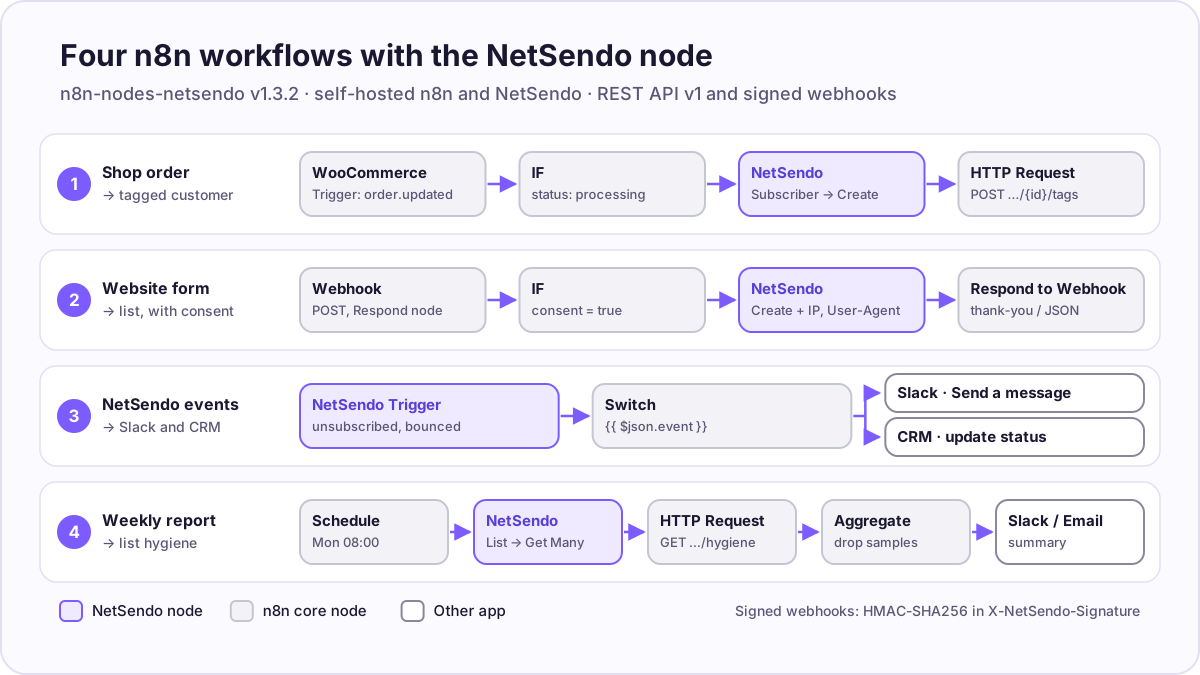 The four workflows in this guide. Purple nodes come from n8n-nodes-netsendo; grey nodes are built into n8n.
When should you use n8n instead of NetSendo's own automations?
Use n8n to move data between systems. Keep messaging logic in NetSendo. Welcome sequences, funnels and tag-based automation rules are part of NetSendo, so they run where the subscriber data lives. n8n earns its place when a workflow crosses systems: an order in the shop has to become a subscriber, an unsubscribe has to reach the CRM, a report has to land in Slack.
Check native integrations first. The NetSendo README lists WordPress, WooCommerce, Stripe, Polar and Shopify. If one of them already does what you need, it is one less moving part than an n8n workflow.
What do you need before you start?
You need four things:
- A self-hosted n8n. The n8n docs say "Unverified community nodes aren't available on n8n cloud and require self-hosting n8n", and that installing from npm is only available on self-hosted instances (n8n docs). A Docker install of n8n's Community Edition is enough.
- A running NetSendo instance with HTTPS. If you don't have one yet, the quick start takes
git clone,cp .env.example .envanddocker compose up -d. The SILVER licence is free for your own business; you pay for the server and the sending provider. - A public HTTPS URL for n8n, so NetSendo can deliver webhooks to it. Behind a reverse proxy, set
N8N_WEBHOOK_URL(it replacesWEBHOOK_URL, deprecated from n8n 2.35.0) to your public address (n8n docs). - An n8n Owner or Admin account. Only those roles can install community nodes (n8n docs).
How do I install the NetSendo community node?
In the n8n editor, go to Settings → Community Nodes → Install, enter n8n-nodes-netsendo, tick the box that confirms you understand the risks of unverified code, and select Install. That is the whole GUI install described in the n8n docs. You can pin a version, for example n8n-nodes-netsendo@1.3.2.
Two other methods exist:
- Manual install (queue mode or private packages). Open a shell in the container (
docker exec -it n8n sh), create and enter~/.n8n/nodes, runnpm i n8n-nodes-netsendoand restart n8n (manual install). - Environment variables (fixed set of packages at startup). Per the n8n docs, this needs two variables and a JSON array:
N8N_COMMUNITY_PACKAGES_MANAGED_BY_ENV=true
N8N_COMMUNITY_PACKAGES='[{"name":"n8n-nodes-netsendo","version":"1.3.2"}]'
Read the caveats before you use the environment method. On the first start, n8n uninstalls community packages that aren't in the list, the Community Nodes page becomes read-only, and an unvetted package can stop n8n from starting unless N8N_UNVERIFIED_PACKAGES_ENABLED allows it or you pin a checksum.
About the risk. n8n warns that community nodes "have full access to the machine that n8n runs on" and to the data in your workflows (risks). The NetSendo node is MIT-licensed and its source is on GitHub, so you can read it before you install. Pin the version and read the changelog before upgrading.
How do I connect n8n to NetSendo?
Create an API key in NetSendo, then create a NetSendo API credential in n8n with two fields: the Base URL of your installation and the key.
- In NetSendo, go to Settings → API Keys and create a key. It has the format
ns_live_…and is shown only once (API docs). - In n8n, go to Credentials → Create New, search for NetSendo API and fill in:
- Base URL: the root of your NetSendo installation, for example
https://mail.example.com, without/api/v1. The node adds that path itself. - API Key: the
ns_live_…key.
- Base URL: the root of your NetSendo installation, for example
- Save. n8n tests the credential with
GET /api/v1/lists, so the key needslists:read.
Give the key only the permissions your workflows use. The node's README lists them like this:
| Workflows that use… | Permissions |
|---|---|
| Subscribers and lists | subscribers:read, subscribers:write, lists:read |
email:read, email:write |
|
| SMS | sms:read, sms:write |
| NetSendo Trigger | webhooks:read, webhooks:write |
Source: n8n-nodes-netsendo README, v1.3.2. subscribers:write includes subscribers:read (API docs).
Use separate keys for separate jobs, for example one read-only key for reporting and one write key for the shop sync. A leaked reporting key then can't send email.
What can the NetSendo node do?
The action node covers subscribers, lists, sending and tracking. It does not manage campaigns, automations, tags or list hygiene; for those, use the REST API through n8n's HTTP Request node, or the MCP server if a person is driving.
| Resource | Operations in v1.3.2 | Useful details |
|---|---|---|
| Subscriber | Get Many, Get, Get by Email, Create, Update, Delete | Create takes Email and Contact List, plus optional First/Last Name, Phone, Source, Status, Client IP Address, User-Agent, Device Type and custom fields. Delete is a soft delete. |
| List | Get Many, Get, Get Subscribers | Get Subscribers filters by status: active, inactive, unsubscribed, bounced. |
| Tag | Get Many, Get | Read-only. |
| Send, Send Batch, Get Status, List Mailboxes | Batch targets a list, tags or subscriber IDs, can exclude lists, and can be scheduled. | |
| SMS | Send, Send Batch, Get Status, List Providers | Picks recipients from a list's subscribers who have a phone number. |
| Pixel | Track Event, Batch Track Events | Sends tracking events such as page_view or purchase. |
Source: n8n-nodes-netsendo README and node definitions, v1.3.2, checked 2026-10-17.
The NetSendo Trigger README lists these events: subscriber.created, subscriber.updated, subscriber.deleted, subscriber.subscribed, subscriber.unsubscribed, subscriber.bounced, subscriber.tag_added, subscriber.tag_removed, email.queued, sms.queued, sms.sent and sms.failed. When you activate a workflow, the trigger registers a webhook in NetSendo named "n8n Workflow: your workflow name" and stores the signing secret NetSendo returns. When you deactivate it, the trigger deletes that webhook.
Each event arrives as JSON with event, timestamp and data. For subscriber events, data holds a subscriber object (with id, email, first_name and more) and usually list_id and list_name (payload reference).
Workflow 1: How do I add WooCommerce customers to NetSendo with a tag?
Trigger on paid WooCommerce orders, create or update the subscriber on a "Customers" list, then set a tag with one HTTP request. Four nodes.
1. WooCommerce Trigger. Event: order.updated (the node also offers order.created, customer.created and others, per the n8n docs). order.updated lets you react when the order reaches a paid status rather than when it is placed.
2. IF. Continue only when {{ $json.status }} is processing or completed. If you collect marketing consent at checkout, for example a checkbox saved in the order's meta data, add that condition here. Without consent, keep buyers out of marketing lists.
3. NetSendo → Subscriber → Create.
- Email:
{{ $json.billing.email }} - Contact List: Customers (picked from the dropdown, which the node loads from NetSendo)
- Additional Fields → First Name / Last Name / Phone:
{{ $json.billing.first_name }},{{ $json.billing.last_name }},{{ $json.billing.phone }} - Additional Fields → Source:
woocommerce - Custom Fields: for example
last_order_total={{ $json.total }}. The field must already exist in NetSendo; the dropdown lists your custom fields.
You don't need a separate "find or create" step. If the address already exists, NetSendo adds it to the list or reactivates it and answers 200 instead of 201, without creating a duplicate (API docs). A new list membership also starts that list's autoresponder sequence.
4. HTTP Request (tags). Version 1.3.2 of the node can only read tags, so set them through the documented REST endpoint:
- Method: POST
- URL:
https://mail.example.com/api/v1/subscribers/{{ $json.id }}/tags - Authentication: Generic Credential Type → Header Auth, Name
Authorization, ValueBearer ns_live_…(n8n docs) - Body (JSON):
{{ JSON.stringify({ tags: [...new Set([...$json.tags.map(t => t.id), 12])] }) }}
That endpoint replaces all of the subscriber's tags (API docs), so the expression keeps the existing tag IDs from step 3's output and adds the new one (here 12, the ID of a "customer" tag; look it up once with Tag → Get Many). Adding a tag fires subscriber.tag_added, which you can use to start a NetSendo automation.
Workflow 2: How do I send a website form to a NetSendo list, and what about double opt-in?
For a form whose consent is already handled, post it to an n8n Webhook node and create the subscriber with the visitor's real IP and browser. For double opt-in, let NetSendo's own form collect the address, because contacts created through the API skip the confirmation step.
Path A: form → n8n → NetSendo (single opt-in)
1. Webhook. HTTP Method: POST, path such as newsletter-signup, Respond: Using 'Respond to Webhook' Node. If your site's backend forwards the form (rather than the visitor's browser posting straight to n8n), protect the webhook with Header auth or the IP(s) Allowlist option, and have the backend pass the visitor's IP in the body (n8n docs).
2. IF. Continue only when the consent checkbox is true, for example {{ $json.body.consent }} equals true. Also drop requests whose honeypot field is filled.
3. NetSendo → Subscriber → Create.
- Email:
{{ $json.body.email }}, Contact List: Newsletter - First Name:
{{ $json.body.first_name }}, Source:website-form - Client IP Address:
{{ $json.headers["x-forwarded-for"] }}when the browser posts to n8n through your reverse proxy, or the IP field your backend sends - User-Agent:
{{ $json.headers["user-agent"] }}
Pass the IP and User-Agent on purpose. Without them, NetSendo records n8n's address and agent, because n8n is the one calling the API. The node README added these fields in v1.3.0 for exactly this case, and they help when you have to show where and how someone signed up.
4. Respond to Webhook. Return a short JSON or redirect to your thank-you page.
Path B: double opt-in
Contacts created through the API get status Active by default (API docs). NetSendo doesn't send a confirmation email for them, and the list's sequence starts at once. That fits sources where consent is already confirmed, such as a checkout checkbox. It is not double opt-in.
If you need double opt-in, which is common practice in Poland and Germany, put a NetSendo signup form on your site for a list with double opt-in turned on. NetSendo then sends the confirmation email and starts the sequence after the click. Use n8n after that, for example with Workflow 3, instead of putting n8n between the form and the list.
Workflow 3: How do I send NetSendo unsubscribes and bounces to Slack or a CRM?
Start the workflow with the NetSendo Trigger, branch on the event name and post to Slack or update your CRM. Three or four nodes, no polling.
1. NetSendo Trigger. Events: Subscriber Unsubscribed and Subscriber Bounced. Activate the workflow; NetSendo now has a webhook pointing at it.
2. Switch. Route on {{ $json.event }}: subscriber.unsubscribed and subscriber.bounced.
3a. Slack → Message → Send a message (n8n docs). Channel: #marketing-alerts. Text, for example: Unsubscribed: {{ $json.data.subscriber.email }} from {{ $json.data.list_name }}. Bounce events carry bounce_type and bounce_reason in data.
3b. Your CRM. Use n8n's node for your CRM, or an HTTP Request to its API, to set the contact's email status. Then sales stops sending manual follow-ups to someone who opted out.
Two habits keep this workflow reliable:
- Make it idempotent. Treat the same event arriving twice as normal. Look up the CRM contact first, and only change it if the status differs.
- Watch the failure counter. NetSendo deactivates a webhook after 10 consecutive failed deliveries (webhooks docs). If n8n is down for long, re-activate the workflow, and use a scheduled check such as Workflow 4 to catch anything you missed.
Mind the personal data. An email address in a Slack channel is personal data in another processor's system. Post counts or subscriber IDs where the address isn't needed.
Workflow 4: How do I build a weekly list hygiene report?
On a schedule, read every list, ask NetSendo's hygiene endpoint for its health score, and post a short summary. The workflow only reads data and changes nothing.
1. Schedule Trigger. Trigger Interval: Weeks, Monday, 08:00, or the cron expression 0 8 * * 1. The schedule uses the workflow's timezone if set, otherwise the instance's. It only runs after you publish the workflow (n8n docs).
2. NetSendo → List → Get Many. This operation returns one page of lists. Under Options, set Per Page high enough to cover all your lists (the default is 25).
3. HTTP Request (hygiene). Method GET, URL https://mail.example.com/api/v1/lists/{{ $json.id }}/hygiene, the same Header Auth credential as in Workflow 1. The key needs lists:read. Per the API docs, the response contains a health score from 0 to 100, counts per issue category (for example hard_bounced, disposable_domain, never_engaged, dormant) with samples, the engagement split and ranked recommendations.
4. Set or Code. Keep the list name, the score and the category counts. Drop the samples, because they contain real addresses.
5. Aggregate, then Slack → Send a message or NetSendo → Email → Send to yourself. For the email, set Email Address, Subject (for example List health, week {{ $now.toFormat('W') }}) and Content (HTML) built from the aggregated rows.
A version with only the NetSendo node also works: List → Get Subscribers with Return All on and Status = Bounced, then Status = Unsubscribed, and count the items. You lose the score and the categories.
Don't automate the clean-up itself. The hygiene clean and dedupe endpoints run with dry_run=true by default and need confirm=true for destructive actions, for good reason. Let the report go to a person, and let the person decide.
How do I secure the webhooks between NetSendo and n8n?
Use registered (signed) webhooks, verify the signature over the raw body, and keep keys narrow. In short:
Prefer registered webhooks to per-list webhooks. Webhooks created through the API (which is what the NetSendo Trigger does) are signed with HMAC-SHA256 and carry
X-NetSendo-Signature,X-NetSendo-EventandUser-Agent: NetSendo-Webhook/1.0headers (NetSendo docs). The webhook URL you can set in a list's settings has no secret, so its requests aren't signed.Know what the trigger checks. In v1.3.2, the NetSendo Trigger compares the signature when the request carries the header. A request without the header isn't rejected. Treat the n8n webhook URL as a secret, and don't post it in tickets or screenshots.
For strict verification, check the raw body yourself. Register a webhook with
POST /api/v1/webhooks(body:name,url,events), save thesecretfrom the response (it isn't shown again), and point it at a plain n8n Webhook node:- Webhook with the Raw Body option on.
- Crypto → Hmac: Type SHA256, Binary File on (the raw body), Encoding HEX, with the webhook's secret stored as the Hmac Secret in the Crypto credential (n8n docs).
- IF: the computed value equals
{{ $('Webhook').item.json.headers['x-netsendo-signature'] }}. Stop the workflow on false.
Hash the bytes as received. If you parse the JSON and serialise it again, escaping and key order can change, and the digest won't match.
Limit who can call n8n. The Webhook node's IP(s) Allowlist returns 403 to everyone else (n8n docs). If NetSendo and n8n share a Docker network or a private network, keep the traffic there.
Scope and rotate keys. One key per workflow group, minimal permissions, and a new key when someone leaves. A key with
email:writecan send email to your whole list.
The webhooks page in the NetSendo docs has a Node.js signature example.
What are the limits of the n8n + NetSendo setup?
Most limits come from n8n, not from NetSendo. Know these before you build:
- API rate limit: 3,000 requests per minute per API key; above it, NetSendo returns
429(API docs). Batch where you can: the node's Send Batch for messages, andPOST /api/v1/subscribers/batchfor bulk inserts. - Node coverage: v1.3.2 has no operations for campaigns, automations, funnels, tag writes or hygiene. Use HTTP Request for those, with the same API.
- Paging: Subscriber → Get Many and List → Get Subscribers return up to 5,000 items unless you turn on Return All. List → Get Many returns a single page, sized by its Per Page option.
- Sending volume isn't capped by NetSendo; it depends on your provider (Amazon SES, Mailgun, SendGrid, SMTP or NMI). Deliverability is your job on a self-hosted stack: see the deliverability guide.
- Community node upgrades can break workflows (n8n risks). Pin the version and test upgrades on a copy.
n8n or the MCP server: which one do I need?
Both use the same NetSendo API, for different jobs. n8n runs fixed workflows on events and schedules, without a person. The MCP server lets an AI assistant such as Claude or Cursor work with NetSendo when you ask it to, for example "summarise last week's unsubscribes". Version 1.5.1 of @netsendo/mcp-client has 77 tools. See the self-hosted MCP server guide and the agents page.
Still choosing a platform? Compare the options in best self-hosted email marketing software, check what 10k, 50k and 100k contacts cost, or read the self-hosted Mailchimp alternative guide. NetSendo is source-available, not open source; here's what that means.
Summary
Install n8n-nodes-netsendo on a self-hosted n8n, add a NetSendo API credential with a narrowly scoped key, and start with one workflow, usually shop orders to a customer list. Use the NetSendo Trigger for events out of NetSendo, HTTP Request for API features the node doesn't cover yet (tags, hygiene), and NetSendo's own forms whenever you need double opt-in. The n8n integration page has the install command.
Frequently asked questions
Can I use the NetSendo node on n8n Cloud?
Can the NetSendo n8n node add tags to a subscriber?
Does a subscriber added from n8n get a double opt-in email?
How do I verify NetSendo webhook signatures in n8n?
Which API key permissions does n8n need?
Is the NetSendo API included in the free licence?
Should I build automations in n8n or in NetSendo?
Try NetSendo on your own server
Self-hosted email & SMS marketing with a free Silver license. Install with Docker Compose in minutes.
Sources
- npm: n8n-nodes-netsendo (v1.3.2 README, published 2026-09-05) · checked 2026-10-17
- GitHub: NetSendo/n8n-nodes-netsendo (node source, MIT) · checked 2026-10-17
- NetSendo: API documentation v1 (subscribers, tags, list hygiene, rate limit) · checked 2026-10-17
- NetSendo: n8n trigger implementation (webhook endpoints, payload, headers) · checked 2026-10-17
- NetSendo README (features, integrations, licence) · checked 2026-10-17
- n8n docs: Install community nodes · checked 2026-10-17
- n8n docs: Install community nodes from the GUI · checked 2026-10-17
- n8n docs: Manual install of community nodes · checked 2026-10-17
- n8n docs: Environment variable installation of community packages · checked 2026-10-17
- n8n docs: Risks of community nodes · checked 2026-10-17
- n8n docs: Webhook node · checked 2026-10-17
- n8n docs: Crypto node · checked 2026-10-17
- n8n docs: Schedule Trigger node · checked 2026-10-17
- n8n docs: WooCommerce Trigger node · checked 2026-10-17
- n8n docs: Slack node · checked 2026-10-17
- n8n docs: HTTP Request credentials (Header Auth) · checked 2026-10-17
- n8n docs: Configure the webhook URL · checked 2026-10-17